Automated Alerts: Efficiently Manage your CAD/EDA/PLM Engineering Software

Automated Alerts are a critical component to efficiently managing your CAD,EDA, simulation software, PLM, MBSE, CFD engineering software.

Not only do we offer the obligatory FlexLM ‘license daemon down’ alerts, but just as important are warnings for license capacity and ‘long checkouts’ (a user has a license checked out longer than the common average checkout time).

Our customers use these alerts as part of a toolkit to improve user ratios and optimization, thereby right-sizing their license requirements.

Trying to Meet Compliance Milestones?

Do you have compliance milestones your team is trying to meet? Are you looking for ways to optimize your discretionary engineering spend and make decision-making faster? TeamEDA can offer a single repository for monitoring usage.

If the estimate is overestimated: The company has paid too much up front. Will the contract allow for underutilized rollovers?

If the consumption is underestimated: The company could be faced with unexpected true-up costs.

Single view of entitlements & contractual requirements.

  • When new licenses are purchased or renewals negotiated, it is a new manager in place who no longer has access to the previous negotiation history of contractual entitlements.
  • Contractual documents
  • Discount agreements
  • PO’s
  • Payment schedules
  • Geographic entitlements

Ensuring you have an accurate compliance overview is essential.

Budget Constraints? Better Decision-Making for Engineering Software Spend

Are you facing budget cuts or constraints this year for your R&D team?

Have you been putting off the analysis of your AutoCAD, GIS, CAD, CAM, Simulation, EDA, PLM, etc. license performance?

Everyone is feeling the pressure of budget cuts and constraints. Are the expenses adding up? Can you cut down on expensive engineering software licenses (CAD, CAM, CAE, EDA, PLM, and many other Design, Simulation, Modeling, and Analysis tools)?

LAMUM helps you meet your budget reduction goals. Our tool helps companies figure out exactly how many engineering licenses they need. They can then use this information for their own predictive modeling to assess future engineering needs.

When are your software renewal dates coming up? Ask us how your organization can save money!

If the renewals are coming up this spring, now is the time to think about a tool that can help you with better decision making as well as:

  • Tracking / reporting / monitoring license denials.
  • Chargeback reports
  • Rightsizing / upsizing engineering departments
  • Engineering software accounting
  • Better utilization of existing and new resources

We help companies in every engineering vertical unlock 20% savings – which puts much needed money back into the R&D budget for other critical activities. A 5 minute call or 15 minute demo will show you the immediate ROI for your department. Get in touch now.

More Resources:

Ways to Reduce Your Engineering Software Spend

Engineering teams around the world are being forced to re-evaluate just about every aspect of their spend and operations. For those who can ride out the storm, managers have important decisions that need to be made. Read more in article from Business 2 Community.

Here are a few considerations:

Software Licensing:
  • IT leadership probably doesn’t know how their current software stacks up to competing products in the marketplace
  • Compile all your commercial software licenses, including perpetual and non-perpetual ones
  • Compare and contrast current and future planned features of your software
  • Look at usage, user details, etc.
  • This will help reduce the costs of unnecessary software and renegotiate accordingly.
Capacity Planning:
  • The production capacity needed by an organization to meet its constantly changing IT demands.
Contract Reduction or Termination:
  • Using LAM can help companies see the termination clauses or renegotiation steps in their software contracts.
  • This could be a great time to renegotiate contracts.

Types of Risks & Ways to Mitigate

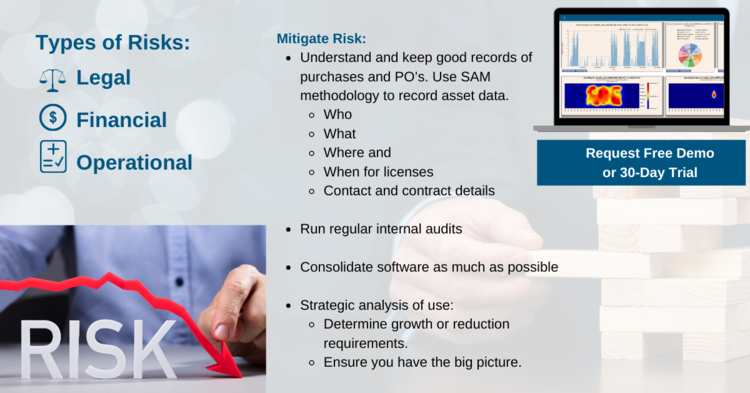
What risks should be considered? Risks could be in the shape of legal, financial or operational. It is also important to look at what companies can do to mitigate risks.

Legal Risks
  • Use in geo-graphic zones outside of contract
    • WAN vs LAN licenses
    • Short term emergency use?
  • Not uninstalling license severs following a server move
  • Using ‘Generic’ users under named-user scheme
  • Do Test environments licensed
  • Use of undocumented features (development code)
  • Pirated and unauthorized software use
Financial Risks
  • Inaccurate budgeting – Unexpected purchases due to poor forecasts.
  • Over expenditure on licenses – Under utilization is common costing the company money.
  • Costs associated with Audits including Legal fee’s, time lost in data gathering and financial settlement agreement.
Operational Risks
  • Uniformed decision making happens when there is insufficient detail on license utilization and / or little understanding of allocation. User ratios may not be measured, thus resulting in unnecessary spend
  • Not being proactive and understanding the latest vendor license models – Subscriptions, Token-based, Named-User, Consumption.
Mitigating Risks
  • Use SAM methodology to record asset data. Understand who, what, where and when for licenses. Understand contact details. Store contract and contact information in one place. Keep good records of purchases and PO’s
  • Run regular internal audits
  • Consolidate software as much as possible
  • Strategic analysis of use –Determine growth or reduction requirements. Ensure you have the big picture.

Do’s & Don’ts of Software Audits for Engineering

Here are a few do’s and don’ts when facing a software audit

Do’s
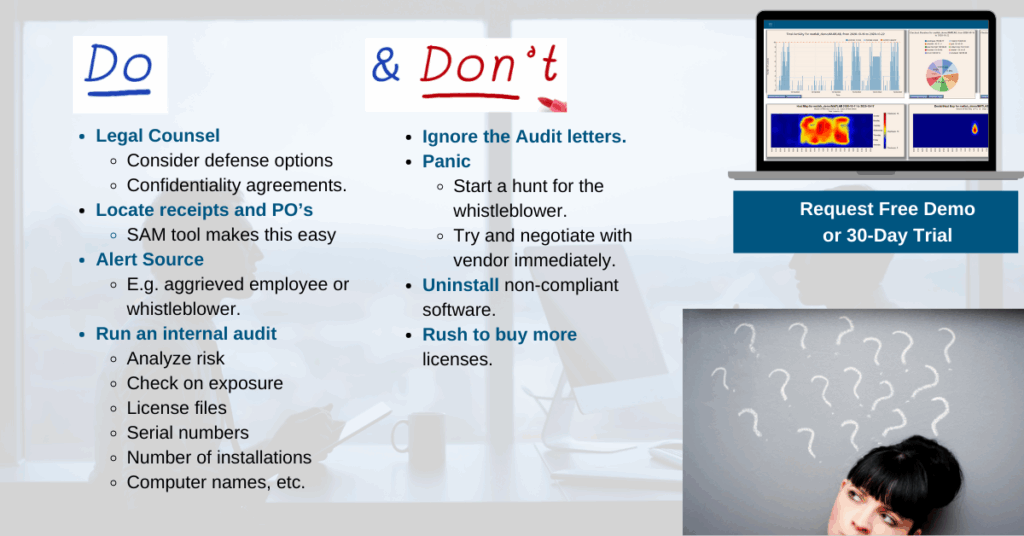
  • Discuss with a legal specialist, there are many defense options –Get confidentiality agreements in place.
  • Locate receipts and PO’s – SAM tool makes this so much easier.
  • Consider where the alert come from, e.g. aggrieved employee or whistleblower. But it can be helpful to think about who the informant is, what they knew, and what they may have reported. In some cases the accusations and allegations are false and slanderous / defamatory. If an employee, did they install it before they left, on purpose?
  • Run an internal audit (analyze risk) to check on exposure –License files and serial numbers, number of installations, computer names, etc. Some purchase information may have been lost due to M&A (this is not a crime).
Don’ts
  • Ignore the Audit letters.
  • Panic –Start a hunt for the whistleblower. Try and negotiate with vendor immediately.
  • Uninstall non-compliant software.
  • Rush to buy more licenses.

All of these issues will be found during an audit or could confirm that you are infringing on your contract.

Check out our post on Types of Software Audits and stay tuned for more resources on software audits.

Types of Software Audits

We are seeing a rise in software audits in the Engineering Software vertical. Just last week one of our clients was being Audited by Ansys.

There are two main reasons for Audits:

  • Combat software piracy
  • Contract Non–compliance

Both can result in fines and are driven as a source of revenue generation. So what are the differences and where do they originate from?

Software Piracy Audit

Where do these originate from:-

  • Whistleblower or ex-employees. – Pirated/ ‘cracked’ licenses and over-installing on multiple workstations (Think Shadow IT).
  • Social media – LinkedIn profiles are an easy target.
  • CV databases – Vendors can ask for a ‘voluntary software audit’, but this can pretty quickly turn into a targeted investigation.
Non-compliance Audit

Where do these originate from:

  • Exceeding the scope of the license (EULA) – Using student or ‘home-use’ licenses for commercial work
  • Vendor reporting technology – ‘Phone home’ mechanisms; report how many installs on a network
  • Software use in unauthorized geographic zone – IP address analysis from ‘Phone home’ mechanisms

Stay tuned for our other posts on software audits.

What Are Your Goals When Trying to Understand Overall Usage?

Has your company been thinking about the best way to implement an enterprise software asset management solution? It sounds great for overall business management and support. But it can take years to evaluate (with appropriate due diligence) and then implement? You often also need a dedicated resource / administrator dedicated to the overall project.

What are your goals when you are thinking of implementing a new tool to consolidate engineering software assets, licenses, and vendor information and gain complete current and historical usage information (including zero-usage)?

But the engineering team really just need the usage statistics for its department? LAMUM is much quicker to implement and easy to use (often in less than an hour). Does the team really needs everything that’s in the SAM solution when really your department is responsible for how and what engineers are using?

With LAMUM, you can adapt an engineering software usage analytics solution quicker. Monitor the leading Engineering tools for CAD, CAM, CAE, EDA, PLM, and many other Design, Simulation, Modeling, and Analysis tools.

With LAMUM, you can have access to much quicker analytics and quicker to make decisions. We often compare it to point solution vs. general solution? What are the goals your team is trying to reach and what is the best way to achieve them?

Another quick benefit is that with LAMUM, you don’t need agents / brokers running on servers.

For more information, checkout: Engineering Software License Management for Various Job Functions

Rethinking eSAM & eSAO Strategy

How much information do you think you need to justify increasing/decreasing license totals for your crucial and expensive Engineering Tools?

Some companies decide to move forward with in house scripts which is normally tied to when a sole individual and others have nothing in place. We have spoken with many IT Professionals who all state that when it comes to the management of their Engineering Tools, in house scripts are useful but extremely time consuming. In situations where there is nothing in place to manage engineering tools, IT solely takes on a reactionary role.

Many organizations needed to change behavior and redirect project efforts. ESAM / ESAO (engineering software asset management and engineering software asset optimization) needed to be put on hold in favor of implementing and managing remote office infrastructure and security.

As increasingly more people are working remotely, there is a greater emphasis on eSAM/eSAO, compliance and auditing as part of the remote office strategy.

However, servers may go down and thus cause issues. As an example, on Wed. Nov. 25th, when AWS went down in North America, it actually actually knocked out several 1000s of services, such as Adobe and others. This has stopped people from using Autodesk products or making it difficult for them to login. Named user and subscription users are all down or struggling to get a license.

Does your company use in-house scripts or no solution in place? Start being proactive about your engineering licenses and gain organization, oversight and minimize time consumption with LAMUM. With LAMUM, you can follow best practices for engineering license management and monitoring. LAMUM (License Asset Manager with Usage Monitoring) is an innovative and best in class suite that helps you leverage your data to properly identify contention of licenses, the need to increase/decrease licenses and ability to alert of denials. LAMUM delivers an organizational structure with oversight to make data driven decisions on what, when and how your expensive engineering tools are being used.

How Engineering Software Asset Management Can Help Cut Costs

Managers are consistently looking for cost-cutting measures to ensure the longevity of their organizations. Regardless of how long the current pandemic lasts, managers must think about how their teams are spending engineering resources (CAD, CAM, CAE, EDA, PLM, and many other Design, Simulation, Modeling, and Analysis tools). Read our blog post – “Right-sizing Engineering Software During Staffing Changes” where we address some considerations.

Managers and CIOs anticipate tightening of budgets for headcount, IT projects, and software. LAMUM can help with managing engineering assets and help managers make better decisions. Managers need to have:

  • Engineering software asset visibility – full view of their IT estate (what they own, what’s being used effectively, etc.)
  • Developing a more cohesive, cost-efficient IT estate.
Questions to consider:
Two topics:
  • Toxic consumption is the unnecessary use of resources due to poor visibility. Make sure your team is actually using the resources you have spent money on and reduce incur unnecessary costs.
  • Bill shock is poor capability planning leads to costly and unexpected bills. Managers must be able track and trend the usage of their cloud estate.

Having a system to save resources could not only help engineering departments save money in the long run but also save jobs.