
What Are License Denials?

Understanding license denials is a critical part of License Asset Management. How do license denials work? Imagine going to a bookstore and borrowing 10 books. But you get a different job, family situations come up or anything else, and you become so busy that you don’t have time to read all 10. Should you have only gotten a few and then bought some more as you had time? The same logic could apply with engineering software licenses.

“Denials” occur when a shared license User attempts to get a tool license, but the license server daemon refuses. This is most often because all licenses are currently checked out. As an example, suppose you purchased 4 shared licenses of a certain tool, 2 licenses on server A, and 2 licenses on server B.

Say that all server A licenses are checked, but one is available on server B. The User may go to server A and get denied, but immediately does get a license from server B. Server A records a “denial”. This is what is called a ‘false denial’. Other situations may report false denials, so a good denial reporting system must filter out false denials.

Getting a denial while accessing your core engineering software not only delays the current project but can affect your entire workflow! How are you handling engineering license denials? Are you able to leverage denial reporting to establish an optimal checkout schedule?

Discover how LAMUM increases productivity by delivering true oversight of your expensive engineering tools. Get alerted when denials occur, when a license is free and when you are near capacity.

LAMUM is a comprehensive software asset management tool for consolidating all engineering software assets, licenses, and vendor information while providing complete current and historical usage information. Our proprietary software monitors the leading CFD Programs: ANSYS, Autodesk, AVL Simulation Suite, CD Adapdo/Siemens, Converge (Reprise), FloEFD & FloTherm, Flow-3D, NUMECA, Pointwise, Phoenics, ANSA, as well as many other EDA, CAD, Simulation and testing software tools.

In summary, there are a lot of different ways to approach License Management. How much you choose to manage is dependent on importance and resources available. In order of importance and ease to implement:

  1. Track inventory of Shared license assets by Product or Bundle
  2. Track Vendor information including Contacts
  3. Track license expiration dates
  4. Track license costs and POs
  5. Track all Contracts and Agreements
  6. Track feature checkouts of FLEXlm shared license managers
  7. Track inventory of Shared and Standalone (node-locked) license assets
  8. Track “Executable” of Standalone licenses

At TeamEDA we can help you assess the software denials and offer you a data-driven recommendation on how to resolve them, which do not necessarily require purchasing more software licenses.

But how can organizations best use their teams to make sure licenses are managed properly? LAMUM’s features support a host of job functions, and so to fully implement LAMUM the following personnel should be made available:

  • IT person to install the LAMUM software, setup email alert system, and install periodic upgrades (occasional job)
  • License Asset Manager – person responsible for keeping track of license inventory of both shared and standalone license assets, contracts, POs, manage Vendor and contact information… (part time job)
  • License Administrator – person who will manage license files using a revision control system (CVS), manage daemons, interface with IT, and create current checkout portals, historical utilization and denial reports as needed. (full time job if greater than 1000 Users)
How do Engineering Managers Save Money on their 2nd Highest Overhead?

For many companies, March 31st marks the end of the quarter. This may be time to make decisions about engineering budgets. How are engineering licenses impacting your business? The second highest department costs are likely to be the cost of Engineering Software Applications. As renewals are coming up, make sure you are well prepared. Would not it be helpful to have a few months of data analyzing the actual usage of the expensive software your team uses?

Whichever industry you are in, the use of CAD tools is very widespread with many leading companies adopting virtual development techniques such as CAE, CAM, EDA, ALM, MBSE, MES, PLM, AR, VR and others.

At TeamEDA, our research has shown that for every 100 engineers a company employs, it is spending approximately $250,000 per year maintaining the Engineering Applications. So, it always amazes me, that when we ask engineers, managers or directors about their perceived use of the software tools, most estimate that they are using less than 40% of the functionality owned.

It is evident that many organizations are not tracking engineer use effectively or managing their expensive software assets. All too often we hear that managers and directors wish to save money, but they do not have the data to allow them to change to more efficient working practices or negotiate software renewals.

So how are managers saving money year on year?

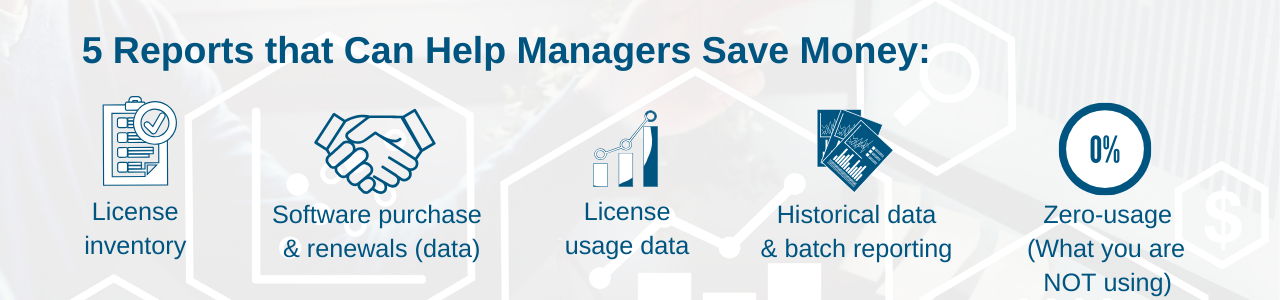
  • Knowing accurately what licenses they have. This involves understanding the number of licenses, the feature add-on purchases and what functionality this provides. Asset management is also very important at this stage for compliance with Software vendor contracts, such as licenses that are only to be used in certain countries (WAN/LAN) or restrictions on license borrow features. Companies must have a strategy for Compliance Audits (Software Vendors) and Quality Audits such as ISO9001. A manager needs to understand information on Vendor, Discipline, License Type, Purchase Type, Restriction Type, Responsible Person, etc. for complete asset management.
  • Having the data to negotiate on software purchase and renewals. Negotiating with Vendors is an important aspect of managing expensive CAD/CAE/+ tools. Every Vendor is different in terms of discounts, negotiating tactics, personality, the side that gets the best “deal” is the one that is better prepared. Managers need to understand historical discounts, vendor behaviors, ‘giveaways’ plus techniques for negotiating future discounts, feature remix deals, multi-year ramp up deals, etc.
  • License usage data is essential. However not all tracking capabilities are equal, many vendor-provided tools are very limited. A leading Engineering Application asset management tool like LAMUM, will provide current ‘Checkout’ information by vendor, feature and user including tools to manage users that hold on to licenses for too long. Engineers are resourceful and know all the tricks in the book to ensure they keep their CAD/CAE/EDA/+ licenses all day, this includes holding while in long meetings or scripts that keeps apps alive for weeks!
  • Historical data and batch reporting is key for decision making. Managers need to understand the concurrent use of features, but maybe, more importantly, the spread or heatmap use of tools and features over a week. Maybe meetings could be modified to get greater license efficiency across the department and avoid buying another 10 licenses? Could licenses be moved from one server to another? How could FlexLM Options files be used for greater efficiency? License denials are critical to a business, many companies rush to buy more licenses when analysis of the occurrences could avoid this. Learn about LAMUM’s best-in-class reporting functionality here.
  • It is most important to understand what you are NOT using! CAD and development software has been in many companies for over 30 years, with purchases often preceding the current management team. At TeamEDA we often see companies that have two or more sets of CAE, CAM, CFD, etc. toolsets, where a new development process has superseded the requirement for the original software, but the company lacks the confidence (or even knowledge of existence) to stop paying for these tools. Eliminating zero-usage features is where the most money can be saved, understanding usage and proactively managing preferred tools, whilst pruning those that no longer offer value to the company.

All of these techniques and many more help Managers understand their license and software tool estate, with the data to make informed decisions whilst ensuring compliance. This is where the 20% can be saved.

TeamEDA are have one product (LAMUM) and a single focus, which is to provide a complete Engineering Application business intelligence platform, delivering data for informed decision making.

LAMUM (License Asset Manager™? with Usage Monitoring) is an Active Directory enabled application providing a complete overview of assets including all vendor information, where servers are located and who are the local admin’s. Full usage reporting, both live and historical, allows managers a complete toolset for analysis and strategy definition.

This post was based on this LinkedIn post by Paul Empringham, TeamEDA’s European Sales Director. Paul has over 20 years experience within the Engineering and CAD/PLM software industries. He was a consultant with Siemens PLM working with many of Europe’s most innovative manufacturers. Paul has also held management positions at a number of organizations running Engineering Application teams and delivering large PLM transformation programs. Outside of work, Paul is a Level 2 ECB Cricket sports coach and enjoys skiing whenever the opportunity arises.

Managing Engineering Software’s

Engineering software, including CAD (Computer Aid Design), CAE (Computer Aided Engineering), EDA (Electronic Design Automation), is critical to the Engineering department. How can your engineering department optimize your licenses and reduce costs?

Some of the highest costs in Engineering departments after staffing costs are the Engineering Software tools (CAD, CAX, FEA, CFD, EDA, PDM/PLM, etc.). Engineering departments typically spend $250,000 per year per 100 Engineers. Make sure you are optimizing these expensive software assets by using our LAMUM license intelligence platform to inform decision making for renewal negotiations.

Engineering software is licensed uniquely, controlled uniquely, used uniquely, and is very expensive. Most engineering software is shared so monitoring checkouts, deciding between node-locked, LAN or WAN is critical in managing the balance between cost and availability. Compliance is another concern, especially for a large industrial companies or Defense Contractors. We have built a solution that addresses these issues.

LAMUM is a software product and a “methodology”, which represents “best practices” in this area. LAMUM was created 12 years ago and represents 12 years of refinement towards the perfect tool for managing Engineering software assets.

How is Engineering Software Different?

Business software management vendors focus on the business software management problem. The statement that all software is the same is blatantly false. That’s like saying one screwdriver is good for all screws! They may not understand the different License daemon types, Current Checkouts reporting requirements, or any of the Usage reports, or the difference between a Tool and a Feature. A few other key aspects include:

  • Checkout Heatmap
  • Denials Heatmap
  • Concurrency Graph
  • Reports – Denials, Zero-usage, Averages

You can learn more about this in our White Paper – “Managing Engineering vs. Business Software’s.

LAMUM for the Cloud

What are the key benefits of cloud servers? How are cloud-ready applications different from cloud-native ones?

Cloud servers can be configured to provide levels of performance, security and control similar to those of a dedicated server. However, instead of physical hardware owned by you (or your company) the servers reside on either a shared, or private, “virtualized” environment that is managed by a cloud hosting provider rather than an in-house staff.

Whether using a shared cloud or a private environment, there are many benefits such as the economies of scale by sharing hardware space with other customers and reducing out-of-pocket costs. You can also see the benefits of this almost immediately by only paying for the exact amount of server space used. Cloud servers also allow you to scale your resources as needed, depending on demand. Pay for the amount of infrastructure that you need as you need it.

When choosing software that is compatible with your cloud hosted infrastructure, you might hear 2 options – “Cloud-Ready” and “CloudNative.” What are the differences between Cloud-Ready vs. Cloud-Native applications?

Cloud-Ready Applications
  • Originally designed either for use on a single machine or an on-site server.
  • Features were originally built for static environments.
  • The original coding and formatting has been updated and made compatible with the dynamic abilities of the cloud.
  • Typically have APIs built into the software as needed that work to collaborate with other programs and services.
Cloud-Native Applications
  • Services are packaged as lightweight containers – independent and autonomous services that, unlike virtual machines, can scale-out and scale-in rapidly.
  • Developed with the languages, run-times, and frameworks native to the cloud service it was designed for.
  • Created using lightweight APIs based on protocols such as representational state transfer (REST), Google’s open source remote procedure call (gRPC) or NATS. REST is used as the lowest common denominator to expose APIs over hypertext transfer protocol (HTTP).

This is similar to the way that License Asset Manager with Usage Monitoring allows you to track the actual, real-time, usage of your engineering software applications and shows you where you are able to scale down and where you need to, if anywhere, scale up. Using both allow you to scale your CAD, CAE, CAM, EDA, and PLM services, licenses, and infrastructure to your company’s needs on demand. You can learn more by reading our White Paper LAMUM for the Cloud.

Mergers, Acquisitions & Staffing Changes: Are You Ready?

Right now is a critical time for many companies to make crucial decisions about acquisitions, mergers and changes in staffing. As organizations are thinking about ways to move forward, it is becoming increasingly important to consider what engineering licenses are needed.

  • How many CAD, EDA, PLM or any other engineering licenses do you currently have?
  • What are the future needs and expectations?
  • How will mergers and acquisitions affect your engineering team?
  • How do you manage the different engineering licenses across the various groups?
  • Did your company need to furlough engineering employees or are you currently in the exciting stage of needing to hire more talent?

With the recent increase of both acquisitions and mergers, it can be a two-fold challenge at times. Corporate companies want to make sure that the companies they are investing have a system to manage all of their engineering licenses for greater visibility and transparency. The smaller companies are trying to learn how to show compliance, learn corporate structures and best ways to enter a new way of working.

In some larger companies, training departments are in charge of ensuring new colleagues are aware of the tools that the teams are using as well as ensuring that the employees are aware of the product suite available to them. They also oversee that these tools are used in compliance. Check out our overview of how LAMUM can be useful across different job functions.

Ultimately, the training departments need to have a good idea of utilization, especially during the current ongoing pandemic. Managers could really see big savings here. Check out some of our resources to help your company better prepare for staffing changes:

Improve Planning with Better Engineering License Management

Companies use progressively more engineering software for their work. Does your company uses multiple products with overlapping features? As we have talked in our blog before, look at all the various engineering software assets your team is using. An engineering license management tool helps companies with better future planning. It is crucial for engineering teams to understand the actual engineering software and feature usage.

Knowing more about how engineering teams are using expensive software allows companies to:

  • Actionable data for better, data-driven decisions
    • Better budget planning
    • Better return on software investment (ROI)
    • Increased productivity and efficiency and keeping teams on the right track
  • Compliance management
  • Entitlement management
  • Collecting software asset information:
    • Who uses and is responsible?
    • How are FlexLM licenses and engineering software used?
    • Associated costs
    • Software license terms, conditions, renewals
  • Gain intelligence through:
    • Analyzing trends based on combined historic usage
    • Usage tracking as your team’s needs and usage change.
    • Right license types
    • Reducing duplicate subscriptions. Avoid multiple departments registering separately; or if an employee forgot to cancel a previous subscription. It can also be helpful to break expenses down by team, branch or department and automatically generate charge-back reports.
    • Having a clear and up-to-date inventory is crucial.

Can License Metrics Help Your Team?

Brien Posey recently published an article about “5 Reasons Software License Tracking Hardens Your Organization” for IT Pro Today. Our team could not agree more.

When new licenses are purchased or renewals negotiated, it is incumbent on the manager to have good historical and forecast data. If the manager is new, they may have no data, may not have access to the previous negotiation history of contractual entitlements.

Without contractual documents, discount agreements, PO’s, payment schedules, geographic entitlements can all sit-in different IT document systems making it difficult to build a complete picture, or worse, be locked/lost when a manager leaves the company.

Therefore, you must centralize and share all Vendor and usage data, but with ability to set access permissions. With this, a new manager can pick up where the old manager left off.

He also talks about the importance of innovation. We have recently had many discussions at TeamEDA about the need for innovation and that companies must adapt and think about the best ways to innovate to survive and flourish in this challenging time. How can engineering teams innovate and optimize their processes?

Overall, Brien has many tips and great overview. Make sure to check it out!

Zero Usage Reports: Discovering Under-Utilized or Zero-Use Licenses

The biggest challenge for CAD/IT administrators is discovering licenses that are under-utilized or have zero-usage over several months. Running a report that shows a number of licenses that have not been used in the last 365 days, is a clear indication that you may want to negotiate a trade-in or even to stop paying maintenance!

It is certainly important to talk about what is being used, how much, by whom, etc. But it is equally important to look at what is not being used. The Zero Usage report does just that, showing all features/tools that were not used in a specified period of time.

Understanding where licenses are costing your business more money than the value you are receiving is critical to license renewal negotiations. The Zero Usage Report thus plays a key role in helping managers consider:

  • Cost allocations and overall Engineering expenditure
  • Intelligent use of engineering resources
  • Spending restrictions
  • Resource distribution

You can learn more about how our products help you optimize your resources, including identifying zero-used features and providing in-depth reporting on your usage here,