Are Your Estimates Used for Usage Reporting, Strategy Trends or Chargebacks Accurate?

Engineering software is very expensive, with licenses (seats) costing as much as $100,000 each. CAD on average might cost $5-10,000 a seat. CAE $10-20,000 a seat. EDA $20-$50k a seat. Controlling these costs is a management imperative. What do you need? Understanding your needs requires some degree of Usage Reporting and trusting the usage reports that you receive, is critical.

Therefore, controlling these costs is a management imperative. What do you need? Understanding your needs requires some degree of Usage Reporting and trusting the usage reports that you receive, is critical.

If usage is overestimated, the company will be paying too much. If the usage is underestimated the company could be faced with shortages, denials, project delays, and possibly unnecessary mid-term true-up costs.

Getting it right up front, therefore, is crucial for managing these expense engineering assets. Accuracy is paramount. Obtaining accurate usage information for Engineering Applications (CAD, FEA, CAx, EDA, ALM, PDM, PLM, MBSE, etc.) is a little more complex than Business Applications as traditional SAM tools do not monitor FlexNet/Port@Host licensing, or more that 15 other Floating License Manager types.

Therefore, analysts may use a combination of the number of users in an Active Directory group cross-referenced with the maximum numbers in a license file.

We often hear of Excel spreadsheets used to build an estimated usage profile, based on application managers intuition. More mature companies will use in-house scripts or purchase a solution to monitor the license daemons.

This is not trivial, and creating scripts has inherent risks, especially when accuracy is important. There are commercial products available that will give you comprehensive, and accurate usage reports. LAMUM (License Asset Manager with Usage Monitoring) is such a product. LAMUM was built 16 years ago with a focus on accuracy.

Monitoring license servers is a complex business. We have found in-house scripts and competitor tools interpreting check-out log files incorrectly and overestimating usage by up to 150%. This is a serious mistake.

Optimize Your Remote Engineering Workforce & ROI

Research is forecasting that the “Office Environment” might not come back after the Pandemic. Most of the work force is working from home and this causes plenty of strain on the production process. See article from Pew Research.

The ability to talk with a co-worker sitting next you has now turned into email communication and time wasted. Ensure that your workforce does not have to compete for essential engineering licenses that slow down production.

LAMUM (License Asset Manager with Usage Monitoring) delivers oversight which not only powers the ability to make data driven decisions, but also streamlines the organization of your engineering tools.

Be alerted:

  • When you hit capacity
  • Denials
  • Long durations, and
  • Customizable threshold alerts.

Know when and how your expensive engineering tools are being used and optimize your workforce and ROI.

Learn More: Borrowing FlexNet/FlexLM licenses for Homeworking

How Much Are you Spending on Engineering Licenses?

  • How much are you spending on Engineering Licensing?
  • Do you know how much you could be saving or how to leverage data to make sure you are not spending too much?

It may sound like a pop quiz, but these are crucial questions with answers that can affect production rates, project deadlines, budget, and the success of your workforce. LAMUM (License Asset Manager with Usage Monitoring) is our Innovative Engineering License Manager that delivers oversight and enables our clients to make data driven decisions.

Be alerted when licenses are not available or confirm what licenses are not being used. Renegotiate with vendors to ensure your ROI potential is being met.

Schedule a demo or a free trial and get firsthand experience with LAMUM. Join our clientele who are saving 20% annually on engineering licenses and gain oversight to make data driven changes.

Set Up your Remote Workforce for Success

The Pandemic has caused all of us to rethink what can be considered normality. Ensuring your remote workforce is set up for success has become a true necessity. The past year has forced many companies to re-evaluate how the day-to-day operations are being managed with much of the work force working remotely. The insight needed to make data driven operational decisions is more crucial than ever.

TeamEDA’s LAMUM (License Asset Manager with Usage Monitoring) gives control back to you and enables you to make data driven decisions that increase productivity and ROI. LAMUM not only helps our clients save 20% annually on licensing cost but also delivers optimal oversight to make data driven decisions

Engineers working remotely need dependable access to their crucial engineering tools more than ever. Get alerted when licenses are free, at capacity, checked out too long and are over allocated. Simplify engineering licenses and usage monitoring with LAMUM and increase production today!

Contact us to request a free trial of LAMUM and start gaining control over expensive engineering tools. You can also learn more by checking out our blog on Rethinking eSAM / eSAO Strategy

Engineering License Management for Solidworks

Are your Solidworks licenses running out of availability?

Are there Solidworks licenses that have been checked out for excessive periods of time?

SOLIDWORKS, by Dassault Systèmes, is considered the leading mid-range 3D CAD design software, analysis software, and product data management software. Tracking usage across the organization (location, team, etc.) is critical for optimizing license selection and expenditures. Optimize Solidworks licenses that your team uses by taking a look at patterns of historical usage:

  • Groups and Projects
  • License Denials
  • License Efficiency
  • License Harvesting
  • License Pool – Total number of Solidworks licenses and Users
  • Real-Time / Actual usage
  • Checkout times – Times and frequency
Product Suites
  • Design/Engineering
  • Management/Collaboration
  • Manufacturing/Production
  • Simulation
  • 3DEXPERIENCE® Works

LAMUM also monitors: Catia, Enovia and Abaqus.

Alerts

Set up alerts to stay informed about the status of Solidworks licenses (See here).

Reports

We have a full suite of reports available (more here).

Our reports can also help you to look at license usage statistics according to organizational units.

Effectively optimize your Solidworks licenses and ensure all Solidworks resource requirements are met.

4 Steps to Move from Perpetual to Subscription License Models

It seems like only yesterday that Perpetual licenses were the only method to purchase Engineering Software, paying a maintenance fee annually was the accepted practice.

However, the creeping increase in annual maintenance costs, speed of IT transformation and the wider adoption of cloud technologies with continuous software releases have made subscription models more attractive to budget holders. Gartner predicts that by 2020, all new entrants and 80% of traditional software vendors will switch to subscription-based business models, therefore you need to keep up to date with the offers and constantly evaluate if a transition is financially sensible for your company.

It is very likely that the perpetual license model will be obsolete for new customers within the new few years.

Subscription models come in many different forms. The most obvious is moving to a cloud SaaS offering with a monthly fee, but there are many others such as Token, Consumption and On-premise subscription types.

Step 1. Plan

This may seem obvious, but you need to be meticulously planning, researching, discussing best practices with peers, testing and negotiating several months before you intend to make the move to subscription licenses. Ideally, 6+ months before, especially if your vendor offers incentives to move like the recent Autodesk 2for1 transition offer.

Moving from perpetual licenses to subscription could have big financial outcomes, both positive and negative, so ensure you form a working group including any financial leaders who can validate and approve your strategy.

  • Ensure you ask your software vendor for all the financial and contractual terms of a subscription transition. Contractually what happens if you move to a cloud solution and there is downtime, what are the guarantees and response times? How easy is it to extract your data from their service?
  • Take a look at what other vendors are offering on a subscription basis? If you are no longer tied to perpetual licenses, maybe this is an opportunity to move software vendor, especially if it provides better value and flexibility? You need to know what the other vendors are offering, so you have more power in the negotiation phase in Step 4.
  • Guess what, you won’t be the only customer looking at a transition to subscription licenses. So use social media (LinkedIn, Forums, Vendor communities, Facebook, etc.) to find similar engineering software managers that are going through the same process or feedback from those that have already transitioned.
  • As with any problem, make sure you break it down into smaller chunks. How about asking your vendor if you can test a few subscription licenses for 6 months? This will allow you to become familiar with the differences and get answers to questions.
Step 2. Measure

At TeamEDA I am constantly surprised at how many companies do not have a good understanding of license usage. In particular, which licenses are used rarely or not at all. How many denials they are receiving or which features in a license bundle they use, as maybe they could downgrade to a lower level bundle.

  • It is critical that you fully understand the license usage of your engineers. You may have 100 perpetual licenses but through monitoring and analysis, you discover that only 80 have been used. This would allow you to negotiate or trade these 20 licenses in a transition.
  • 6+ months of license usage data is essential. Product development has many phases and we see this reflected in license use. Lot’s of upfront MATLAB, Maths or MBSE work, followed by intensive use of CAD and EDA tools, transitioning to Simulation and PLM licenses. Taking a snapshot of license use a month before a transition could be very costly.
  • I would, of course, recommend that you work with TeamEDA and use our license asset management solution for Engineering software – LAMUM. We have over 16 years of experience in helping the engineering verticals understand their perpetual and subscription licenses. Get in touch today for a short demo.
Step 3. Evaluate costs

Perpetual licenses have a large upfront cost, it is therefore an asset within the company that needs to be managed carefully. The amortization of the asset should have been managed by your financial teams, so it would be good to get a view from them on what value they still hold against the initial purchase price. A perpetual license bought 10 years ago, will have a different value to one bought a couple of years ago.

Many maintenance and support (ME&S) agreements stand at 18-25% of the initial purchase price. It would be good to look at the trend of ME&S increases and talk to your software vendor about their predictions on future price increases.

Vendors are becoming more forceful in their desire to move customers to subscription models. Companies like Autodesk and Atlassian have recently been in the news for drastically increasing ME&S on perpetual licenses, as a big push to move customers to subscription models. When a few vendors are successful with this method, you know many more will use this crowbar method in the future!

If you are moving to a SaaS/Cloud solution, please look at the bigger picture projects costs. A perpetual license for a large CAD installation would require the costs to upgrade every 1-3 years, IT costs like servers, high spec workstations and support. Once you have accounted for all these costs, and projected for future years, it could be a great cost-saving business case to move to a subscription model.

Step 4. Negotiate

The world runs on negotiation and you should never accept that the listed subscription price is one that every customer pays.

Plan your points of leverage for negotiations, this comes back to the meticulous planning you have completed over the 6 months or preparation.

  • Understand how many licenses you actually need in the new subscription framework, hopefully, you have run some trials to evaluate this.
  • List out the value of the perpetual licenses you only use occasionally and use these as bargaining chips for trade-in’s that would be more useful.
  • Ensure you negotiate multiple licenses to reflect the initial perpetual license costs. Autodesk offered 2 for 1, but you should be able to negotiate higher multiples 3 for 1 depending on the software.
  • If the software vendor’s competitors are offering lower subscription prices, make sure you use this during your discussions.

Please remember when you are moving from floating perpetual licenses to named-user subscriptions you are giving up your license ratios. So all the occasional users who dip in and out of licenses for a few minutes a day, will now require a full subscription license.

Conclusion

Planning and awareness is key for a move in the licensing model of your engineering software. Some of you will have very little choice (Autodesk customers), whereas others can plan to move when it suits them. Please do keep in touch with your software vendor to understand their future plans and build a network of contacts looking at a similar evaluation.

Good luck and please do get in touch to discuss anything license related!

Paul Empringham is European Sales Director for TeamEDA, publisher of a niche Software Asset Management (SAM) solution for most Engineering Software (CAD, Simulation, EDA, PLM, MBSE, Maths). We help companies identify savings by eliminating license inefficiencies, right-sizing license numbers and set strategies for renewal negotiations. Book a demo today.

Engineering SAM as an Active Business Practice

Many think of SAM (software asset management) as a glorified spreadsheet for listing licenses and vendors. Instead, SAM could be an active business practice that involves maximizing budget savings by actively controlling and monitoring procurement, entitlement, utilization and the deployment of software licenses.

With our LAMUM solution, we provide a SAM capability for storing all the information about your purchases, license numbers, vendor information, purchase orders and alerts for critical renewal dates. This information allows for inactive metric reporting.

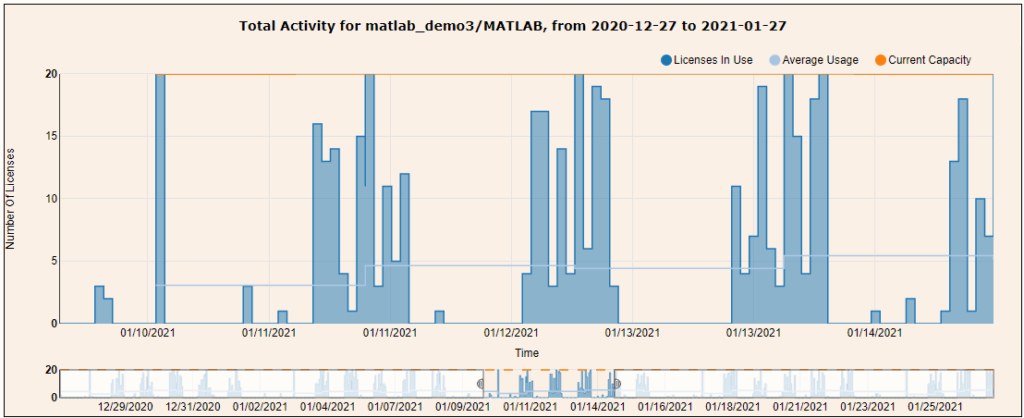
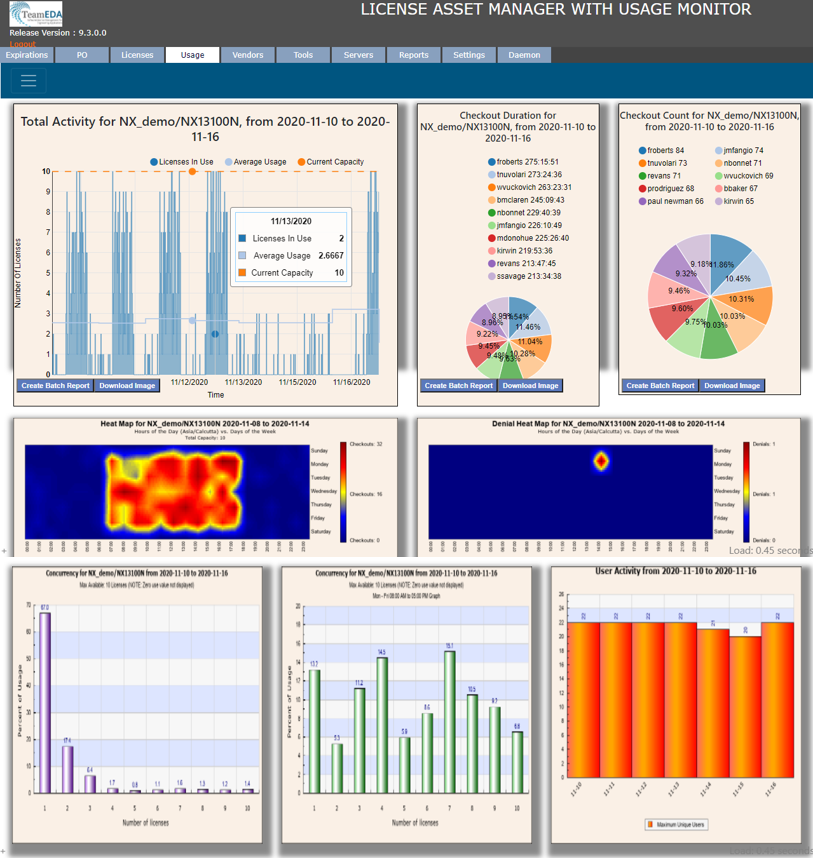
The other half of our LAMUM solution provides Active Reporting methods for floating/networked engineering software licenses. Our customers typically use a combination of historical trend lines, average use, concurrency graphs, zero-use information and denial reports in conjunction with our alerts and batch reports – to build a picture of where licenses can be optimized and savings made. It provides a data-driven view to inform license renewal negotiations.

Contact us today for a short demo and to discuss how LAMUM can provide you insights into your license estate. Without active monitoring, the cost of Engineer Software licenses can easily spiral out of control.

We help 100’s of companies in all industry sectors actively manage their license ratios and gain huge savings on their existing software. They also minimize costs and disruption as they are always audit ready and can show a compliance position when vendors get in touch for audits.

Successfully Measuring CAD or PLM Software Adoption

License Optimization for CAD / CAE / Simulation / EDA / Math / PLM software.

Throughout my career in digital development technologies, I have often been asked: “How can we get a KPI on the success of our PLM delivery program?” I have also been involved in conversations with VP’s or C-Suite asking exactly the same question, but for CAD, Simulation software or EDA upgrades and transitions.

Delivery managers will use the data that is at hand for KPI reports:

  • The progress of users being trained for the new engineering software, with weekly totals.
  • How many new workstations or virtual workstations have been rolled-out.
  • Tracking the number of concurrent users on a system.
  • Measuring the number (or speed) of new parts being ‘released’ in a new CAD or PLM system
  • Reports from department managers claiming success.

All of these measures can be a great way of building up a picture of adoption and success, I have used them myself for reporting up the management chain and I am sure many readers of this article have too.

But there is one important method I did not list above, a method that I have found to be the most accurate and successful, and that is:

Tracking adoption by license usage.

By reporting on the license usage per user, department or division can provide a very granular and accurate indicator of success.

Imagine you were running a project to move from one simulation software to another, let’s say MSC to Ansys. You could provide two charts to your management team, one showing the reduction in MSC license use and the other showing the increase in Ansys license usage. Reduction in legacy licenses is an important KPI, as I have known many new users adopting new tools, who after a few weeks fall back to doing their work on the legacy toolset as they are familiar and quicker with it.

Using a license management and analysis platform like LAMUM from TeamEDA, also allows you to track users down to the license feature.

Imagine you have rolled out Teamcenter or 3Dxperience, you could use LAMUM to investigate whether all of the configuration management team are using the tool and how long for per day, by looking at the Change Management license increment use. If the usage was not as expected, there may be some additional training issues required, a scenario that traditionally may not surface through requests until several weeks later.

Reporting by department can also identify successful groups, prompting a conversation to see how they have managed their communication and key users for their area. If they have found a formula that works, it could be something to replicate across other teams for faster success?

In summary, one of the most effective methods for showing a KPI for project success is via the tracking and analysis of license usage. It is a method that is not open to interpretation and shows a clear story of success.

See original post by Paul Empringham, European Sales Director here.

Discovering Under-Utilized or Zero-Use Licenses

The biggest challenge for CAD/IT administrators is discovering licenses that are under-utilized or have zero-use over several months. Do you have a regular report that provides you with this information?

Understanding where licenses are costing your business more money than the value you are receiving is critical to license renewal negotiations.

Running a report that shows a number of licenses have not been used in the last 365 days, is a clear indication that you may want to negotiate a trade-in or even to stop paying maintenance!

At TeamEDA we deliver all the reporting you need to monitor network floating licenses for CAD, simulation software, CAE, FEA, CFD, EDA, MBSE, GIS and PLM, from live, on-demand and regular batch reports.

Types of Reports

Goals & Benchmarks for Engineering License Optimization

How does your team currently monitor and manage the plethora of engineering software (CAD, CAM, CAE, EDA, PLM, and many other Design, Simulation, Modeling, and Analysis) licenses? What are your goals for 2022? Speaking to many engineering managers, we have come across the following focus areas.

Key goals and benchmarks our customers have asked about:

  • Tracking / reporting license denials
  • Chargeback reports (unbiased)
  • Under utilized CAD / CAE / EDA licenses
  • Overspending (need to trim budgets)
  • Rightsizing with rise and fall of engineering departments
  • License asset and renewal management
  • Usage Data Accuracy
  • Correct interpretation of best-in-class usage reports
  • Getting competent Support, in a timely manner
  • License asset and renewal management

And, more specifically by job title, for CIOs:

  • License compliance
  • Audit readiness
  • Reduce organizational spend

Managers:

  • Reduce spend
  • Address renewal management
  • Better chargebacks

CAD Admins:

  • Increased visibility of engineering software usage – Live view, port 81/82, URL, daemon manager, alerts

Our LAMUM platform is a niche engineering software SAM solution. Our tool provides all the reporting and alert information needed to check on license feature usage, measuring adoption, identifying training requirements and which would be good key users for upgrades.

The tool also helps identify licenses that are underutilized and areas where you could get better ratio optimization. Often resulting in big license cost savings.

Learn more about Solutions by Different Job Functions.