License Server Consolidation & FlexLM License Usage Billing

Are engineering managers complaining that they pay for licenses they don’t use in some regions? How are your cost alignments currently implemented and can a tool like LAMUM bring you greater visibility of engineering software?

Let’s talk licensing over geographic boundaries. For example; sharing CAD licenses from one office in the USA to another in Malaysia. Is this compliant with your Engineering Software license agreement?

The answer is generally NO. Each vendor has its own rules and restrictions and you MUST be aware of these to avoid compliance fines during license audits. Typically sharing between the Western Hemisphere and Eastern Hemisphere is banned, unless you pay to upgrade licenses to a GLOBAL license. Often sharing licenses between countries is also banned.

Are the maintenance costs distributed evenly between the subsidiaries (based on number of engineers, projects etc.)? Some companies are looking at centralizing licenses and having a billing policy based on the actual usage of licenses by each subsidiary (Read here about how centralization of licenses can help your organization).
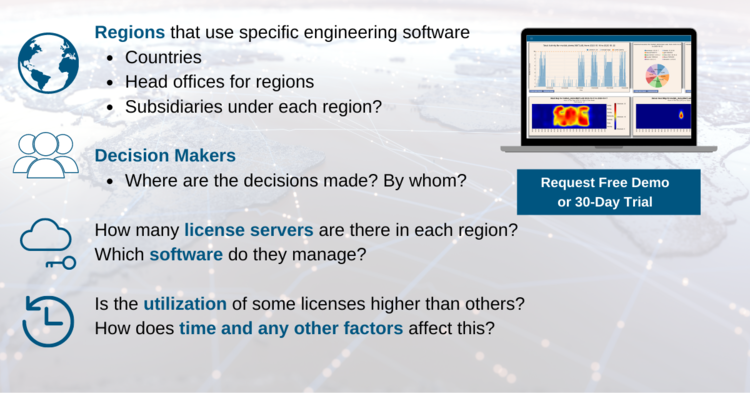
This could entail understanding:

  • Regions that use specific engineering software (countries, head offices for regions, where are the decisions made?)
  • Are there subsidiaries under each region?
  • How many license servers are there in each region?
  • Which software do they manage?
  • Is the utilization of some licenses higher than others?
  • How does time and any other factors affect this?

Many of the software floating (concurrent) licenses are commonly known as FlexLM. Companies can install an unlimited number of seats of the software. The licenses are used concurrently are limited to a predefined number (i.e. set during the purchase).

Many organizations choose to centralize all licenses to a single license server will serve all users worldwide. This will help with greater transparency of total licenses for each software. Can all regions better manage available licenses this way and thus lead to a more balanced usage level?

Talk to our technical experts today, so we can answer any questions you have and help you optimize your engineering spend.

At TeamEDA, we help engineering companies optimize their engineering licenses. We are seeing organizations fail audits because CAD or EDA licenses were lent across geographic boundaries. Software audits are often primarily driven to raise income for software vendors through the form of license agreement compliance failures.

Running a global license can be far too expensive. LAMUM can help you lay the groundwork with your favorite vendor if global licensing or an extended licensing model is the only way to go. You’ll know exactly how many licenses you’ll need at each site in your organization.

Run a free 30-Day trial of our LAMUM solution today, to see if you would fail your vendor license agreement?
Altair License Usage Reports

Altair provides software and cloud solutions for simulation, IoT, high performance computing, data analytics, and artificial intelligence.

Tracking usage across the organization (location, team, etc.) is critical for optimizing license selection and expenditures. Optimize Altair licenses that your team uses by taking a look at patterns of historical usage:

  • Groups and Projects
  • License Denials
  • License Efficiency
  • License Harvesting
  • License Pool – Total number of Altair licenses and Users
  • Real-Time / Actual usage
  • Checkout times – Times and frequency
Product Suites
  • HyperMesh
  • HyperWorks
  • Inspire Suite
  • CFD Suite
  • Altair Suite
  • PBS Works
Alerts

Set up alerts to stay informed about the status of Altair licenses (See here).

Generate Reports

We have a full suite of reports available (more here).

Our reports can also help you to look at license usage statistics according to organizational units.

Effectively optimize your Altair licenses and ensure all Altair resource requirements are met.

Ansys License Usage Reports

Ansys Mechanical finite element analysis software is used to simulate computer models of structures, electronics, or machine components for analyzing strength, toughness, elasticity, temperature distribution, electromagnetism, fluid flow, and other attributes.

Tracking usage across the organization (location, team, etc.) is critical for optimizing license selection and expenditures. Optimize Ansys licenses that your team uses by taking a look at patterns of historical usage:

  • Groups and Projects
  • License Denials
  • License Efficiency
  • License Harvesting
  • License Pool – Total number of Ansys licenses and Users
  • Real-Time / Actual usage
  • Checkout times – Times and frequency
Product Suites
  • FEA
  • Fluent
  • Discovery
  • Lumerical
  • SpaceClaim
  • Electronics
  • CFD
  • Additive
  • Granta
Alerts

Set up alerts to stay informed about the status of Ansys licenses (See here).

Generate Reports

We have a full suite of reports available (more here).

Our reports can also help you to look at license usage statistics according to organizational units.

Effectively optimize your Ansys licenses and ensure all Ansys resource requirements are met.

Synopsys License Usage Reports

Synopsys is at the forefront of Smart Everything with the world’s most advanced technologies for chip design, verification, IP integration, and software security and quality testing.

Tracking usage across the organization (location, team, etc.) is critical for optimizing license selection and expenditures. Optimize Synopsys licenses that your team uses by taking a look at patterns of historical usage:

  • Groups and Projects
  • License Denials
  • License Efficiency
  • License Harvesting
  • License Pool – Total number of Synopsys licenses and Users
  • Real-Time / Actual usage
  • Checkout times – Times and frequency
Product Suites
  • Software Integrity
  • Semiconductor IP
  • Verification
  • Design
  • Silicon Engineering
Alerts

Set up alerts to stay informed about the status of Synopsys licenses (See here).

Generate Reports

We have a full suite of reports available (more here).

Our reports can also help you to look at license usage statistics according to organizational units.

Effectively optimize your Synopsys licenses and ensure all Synopsys resource requirements are met.

Engineering License Management for Siemens EDA / Mentor Graphics

Siemens EDA (formerly Mentor Graphics) is a US-based electronic design automation multinational corporation for electrical engineering and electronics.

Tracking usage across the organization (location, team, etc.) is critical for optimizing license selection and expenditures. Optimize Siemens EDA (formerly Mentor Graphics) licenses that your team uses by taking a look at patterns of historical usage:

  • Groups and Projects
  • License Denials
  • License Efficiency
  • License Harvesting
  • License Pool – Total number of Siemens EDA (formerly Mentor Graphics) licenses and Users
  • Real-Time / Actual usage
  • Checkout times – Times and frequency
Product Suites
  • All IC Products
  • All PCB Software
  • All IC Packaging Software
  • Calibre Design
  • Tanner EDA
  • Solid Edge
  • And more
Alerts

Set up alerts to stay informed about the status of Siemens EDA (formerly Mentor Graphics) licenses (See here).

Generate Reports

We have a full suite of reports available (more here).

Our reports can also help you to look at license usage statistics according to organizational units.

Effectively optimize your Siemens EDA / Mentor Graphics licenses and ensure all Siemens EDA / Mentor Graphics resource requirements are met.

Cadence License Usage Reports

Cadence is a leading EDA and Intelligent System Design provider delivering hardware, software, and IP for electronic design.

Tracking usage across the organization (location, team, etc.) is critical for optimizing license selection and expenditures. Optimize Cadence licenses that your team uses by taking a look at patterns of historical usage:

  • Groups and Projects
  • License Denials
  • License Efficiency
  • License Harvesting
  • License Pool – Total number of Cadence licenses and Users
  • Real-Time / Actual usage
  • Checkout times – Times and frequency
Product Categories
  • Logic Equivalence Checking
  • SoC Implementation and Floorplanning
  • Functional ECO
  • Low-Power Validation
  • Synthesis
  • Power Analysis
  • Constraints and CDC Signoff
  • Silicon Signoff and Verification
  • Library Characterization
  • Test
Alerts

Set up alerts to stay informed about the status of Cadence licenses (See here).

Generate Reports

We have a full suite of reports available (more here).

Our reports can also help you to look at license usage statistics according to organizational units.

Effectively optimize your Cadence licenses and ensure all Cadence resource requirements are met.

In-Depth: Current Tab Explained

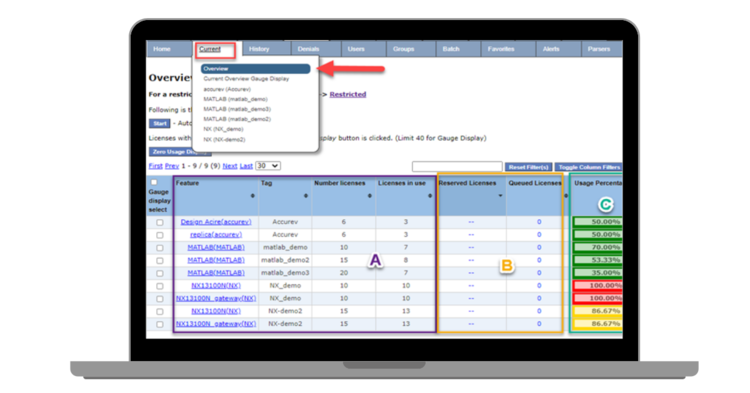
Current Tab
  • Features being monitored
  • Other Tabs – Tags, # of Licenses, # Licenses in use.
  • Track Reservations on licenses and Queued Licenses
  • Usage percentage:
    • Green: below 80% capacity (Total Licenses for feature)
    • Yellow: Over 80% capacity
    • Red: Over 90% or 100% capacity
  • Display the ability to dive deeper by selecting the Feature name (Hyperlinked)
 Current Usage Details
  • This will populate the same information present in the Organizational Unit of AD if synced.
  • This is an example of “Best Practices”, having several lines of communication (Email, Phone Number . . . etc.)
  • LMRemove or Remove button
    • Remove button: User’s need proper permissions to perform LMRemove
    • Having the extra levels of communication and also utilizing “Long Check Out Alerts” allows communication with the user before checking the license back in (or performing the LMRemove), this will cause the end user to lose all save work if performed.
Current Overview Gauge Display

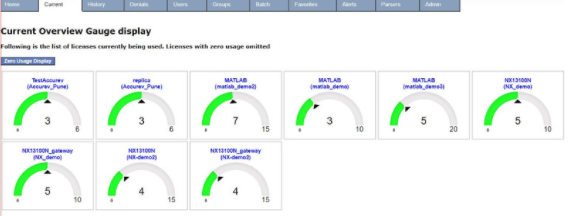
Do you have a single live view of your Engineering software licenses? Using LAMUM, you can share our “Gas Gauge” view with managers and users, allowing analysis of which users are currently consuming the licenses.

We find that our customer’s CAD / System administrators have seen a large reduction in user license admin activities. As using LAMUM, users tend to ‘self-manage’ by contacting each other to access highly contested licenses.

Monitor usage almost in real-time to monitor: Tag Name (Port@Host), Capacity, users who have a license checked out, time a license has been checked, total time in use, revoke an over-checked out license and reminders.

The Gas Gauge display is extremely popular with Dept. Heads and Engineering Managers

This display auto updates and is commonly opened as a browser favorite and left open as an overview

  • Color indications
    • Green: Below 80% capacity
    • Yellow: Above 80% capacity
    • Red: Above 90% -100% capacity
  • You have the same ability to dive in, (Select the Hyperlinked Tag)

In-Depth: LAM Tabs Explained

Track any of the following data for license inventories by:

  • Vendor information (name, tool, quantity, # seats)
  • Dates (Acquired, renewals and terms)
  • Purchase type (Subscription, Perpetual,….*)
  • Restrictions on use (WAN, LAN, Node,.…*)
  • Costs and associated PO, Req
  • Related contracts and documents
  • Manager / Person Responsible
  • Associated License Manager (port@host, daemon, License / Option / Debug Log files,….) and license server information
  • Floating, Node-locked, or Named-User licenses Information
  • 1,000 Vendor or 100,000 Line Items

Here are a few of the LAM tab explanations:

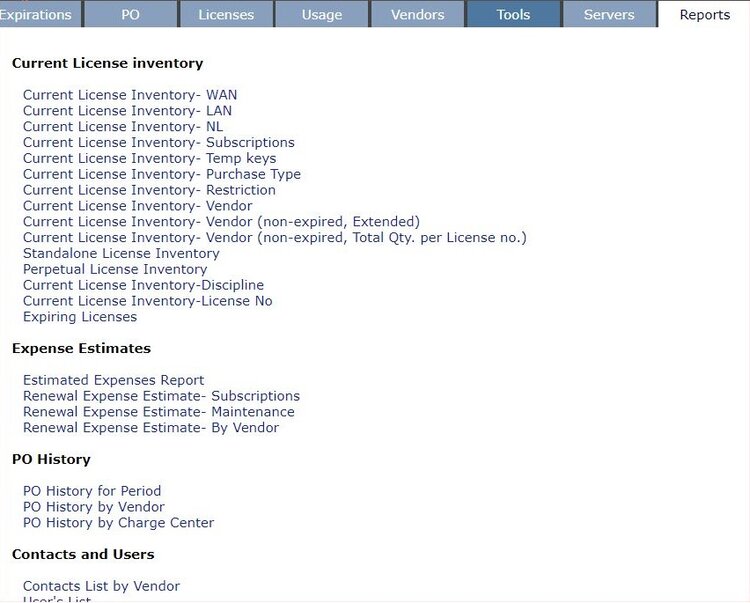
Expirations Tab: Can view expirations in last and next 30 Days

P.O. Tab: More information about the various P.O.s.

Licenses Tab: This will render the licenses that user is responsible for. A new vendor or new tool will replicate within LAM (Vendor/tool tabs).  They also can be edited at anytime

Vendors Tab: Great place for keeping notes for the group on current status with vendor and negotiations

  • Contacts Field: Most of the time there are several vendor reps who are dealing with the company, centralize the contact information and communication notes
  • List of Items:  all purchased products pertinent to the vendor (Cadence)

Tools Tab: You can see all the tools that we are monitoring. You can filter a search. Columns are interactive (Ascending/Descending)

Servers Tab: You can see a list of:

  • All Daemons currently running on this server
  • Port associated with daemon on the server
  • Vendor attached to daemon and associated Tag.

Settings Tab

  • Admin: Read/Write Permissions, Manager: Read/Write/Edit.
  • Adding a new user is straight forward interactively.
  • Global Settings: This is utilized for setting up the email server and “TYPES“

Tekla (by Trimble) License Usage Reports

Looking for a license optimization tool for growth and monitoring Tekla license servers?

Looking to control access to high-cost, advanced features licenses offered by one of the Tekla license servers?

Are your Tekla (by Trimble) licenses running out of availability?

Are there Tekla (by Trimble) licenses that have been checked out for excessive periods of time?

Tekla software for construction and structural engineering is made by Trimble. With Tekla structural solutions, customers can work on projects around the world, from housing and bridges to factories and skyscrapers.

Tracking usage across the organization (location, team, etc.) is critical for optimizing license selection and expenditures. Optimize Tekla licenses that your team uses by taking a look at patterns of historical usage:

  • Groups and Projects
  • License Denials
  • License Efficiency
  • License Harvesting
  • License Pool – Total number of Tekla licenses and Users
  • Real-Time / Actual usage
  • Checkout times – Times and frequency
Product Suites
  • Tekla Structures
  • Tekla Structural Designer
  • Tekla Tedds
  • Tekla PowerFab
  • Trimble Connect
  • Tekla Model Sharing
  • Tekla Civil
Alerts

Set up alerts to stay informed about the status of tekla licenses (See here).

Generate Reports

We have a full suite of reports available (more here).

Our reports can also help you to look at license usage statistics according to organizational units.

Effectively optimize your Tekla licenses and ensure all Tekla resource requirements are met.

Software Audit Compliance & Types of Licenses

Licensing for engineering software can be node-locked, named-user, or floating (also called concurrent-use).

Floating is most popular because licenses can be shared. However, the Vendor puts a restriction on how much sharing can occur.

Floating licenses can be WAN (wide area network) or LAN (local area network). WAN can cover a country, a continent, or global. The wider the coverage the more expensive the license. LAM is typically a local city, campus, or Lab. LAN is less cost per seat than WAN.

Node-locked or User-locked is less expensive than LAN. When faced with the increasing threat of software audits, ensuring you have an accurate compliance overview is essential.

You must ensure you understand your license contractual requirements, such as not utilizing geo-located licenses across state or international boundaries. Which can often be forgotten, for example, when a German license server has 40 spare licenses and the Indian server is suffering constant denials, sharing licenses from Germany to India would resolve the situation. But this would also lead to a non-compliant license situation, an easy mistake to make at system admin level and an event the auditors will look for immediately. Audits can become “very, very expensive”.

Software license audits are feared across the industry, but with the right planning and processes in place to ensure you have an accurate picture of your license asset, obligations, and usage, the level of risk is substantially mitigated.

TeamEDA’s LAMUM (License Asset Management and Usage Monitoring) product is the only industry toolset to combine asset management (tracking vendors, contacts, contractual documents, PO’s, etc) with a proprietary algorithm to ensure a 3 point check on actual license usage providing a holistic view of license assets and usage.

This information can then be used to inform decision makers for purchases and renewals, often saving our customers over 20% annually.