The current economy and the pandemic has emphasized the need to cut costs and preserve cash on hand for all companies. Workplaces are changing and trying to navigate and optimize their processes. Is now the time to consider your engineering software asset inventory?
“It’s often said that “you can’t cut your way to growth,” but you can cut your way to survival.”
– Gartner
Gartner took a look at a few ways to reduce IT costs (Read article). Managers are looking more at their engineering and IT spends. Here are a few considerations when planning your IT inventory spend:
Is your organization buying the right amount of engineering software licenses?
How do staffing changes affect the number of licenses you need?
Are you prepared if vendors increase compliance efforts?
What are potential savings?
Our solution has helped companies save 15-25% of their engineering software spend.
Here are a few tips:
Consider your engineering software licenses:
Are there licenses that no one is using or are unnecessary?
Should licenses be reassigned?
Can expensive licenses be shared across the team?
Are there application redundancies (similar functions)?
Target immediate impact – look at monthly and quarterly expenses (in 1-9 months, not years).
Consider discretionary (new projects) and non-discretionary cost (reducing usage – where LAMUM can be very useful).
Look at both variable (dependent on volume) and fixed (subscriptions, etc.) costs.
Inspect accounts – looking at expense level detail (This is where the asset management side of our product is very helpful).
Start with large, upcoming software renewals.
Have you considered the changes in your team?
Employees who have left the company or are in different groups or business fields (Did you know that our solution offers a chargeback reports?)
Inactive users vs. users who are logging in more frequently
Contractors who may no longer need access
Our technical experts are ready to answer your questions and support during this challenging time.
You are probably using a number of different engineering software programs for design.
But do you have a method currently to track whether you have more licenses for the software than is needed?
Or where use is so low on some software, it would be more economic to move the users to a different solution?
Managing down costs is a huge driver for all companies currently, with our LAMUM (License Asset Management and Usage Monitoring) solution from TeamEDA, we are confident we can identify 20% savings on licenses.
Did you know that about 80% of floating license types are FlexLM? How are you monitoring FlexLM usage?
Many Vendors use FlexLM to control checkouts for their applications. The daemon is what monitors and limits those checkouts. With the Daemon Manager it possible for you as the administrator to have more control over your licensing environment with license servers located all over the world, from our tool, from anywhere in the world.
LAMUM to actively monitoring those daemons by issuing a lmstat command every 5-60 minutes (depending on each customer’s environment) and making sure each license server and daemon is active, and to collect current checkout status of those licenses.
Being able to control these daemons, manage License and Option Files, start/stop/restart daemons remotely, gives you as an administrator more oversight and flexibility to manage and monitor your engineering software licenses, and assure availability.
Daemon manager allows you to control FlexLM daemons from the LAMUM console. The following functions can be performed:
Manage daemon information, including the associated License and Option files, and Debug Logs
Start, Stop, Restart or Delete daemons
Edit License or Option files
Reread License or Option files
View/Edit Debug logs
Daemons can be entered either on the LAM side of LAMUM, during Line Item port@host entry, or directly into the Daemon Manager Overview page at “Add Daemon”. TeamEDA recommends adding the daemons on the LAM side during port@host entry.
Has your organization over and / or under-purchased licenses?
Are you maximizing the cost efficiency of licenses?
Are there periods where licenses are underutilized because everyone is in meetings or in the field?
Making the most of the Engineering and IT spend has becoming increasingly crucial for companies to continue operating successfully. Today, many companies understand the benefits of effective software license management, cost optimization and compliance. However, how do organizations ensure their investment in expensive engineering licenses is well spent? Engineering departments need to ensure the licenses are optimized and purchased intelligently.
This ongoing process requires constant monitoring. Did you know that the average spend of engineering licenses could be $10-150k per seat. If a few of these licenses are unnecessary, could this be a big saving for your company? This is where optimizing the engineering software license efficiency comes in.
Engineering departments have many choices for the software they use to be successful and determine how many licenses each group requires. By providing engineering departments access to tools and then managing and tracking their activity (through usage monitoring) results is a win-win for users as well as management.
Share relevant vendor, contact, contract and PO information.
Understand current checkouts, usage patterns and trends.
Know what is not being used.
Avoid excess purchase traps.
Receive relevant alerts.
With a tool like LAMUM, engineers can use the tools that are available, while managers can see when users are actually using such software (See more in our recent blog posts about Alerts and Reports).
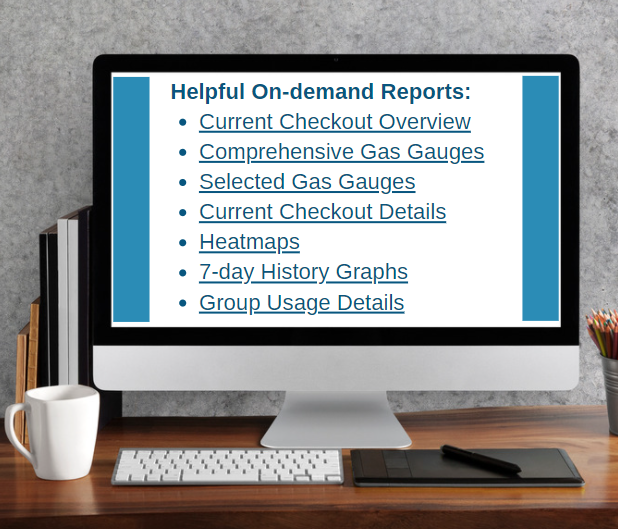
On-demand Reports are one-click, commonly needed reports. The data in these reports is real-time and includes most current data. LAMUM offers 3 ways to create on-demand reports.
“Favorite” in your browser
Create the report you want.
Save the URL as a Favorite in your browser.
Give it a user-friendly name.
When clicked, the Favorite will create that report on-demand, with most current data.
A Link in “Favorites Tab in LAMUM”
Create the report you want, save it to Favorites.
Give it a user-friendly name, save.
When you would like to see the on-demand report, just click on the link. That report with most current data will appear.
“User Dashboard”
Choose a Dashboard medium: SharePoint, Google Doc, Word, PDF, Company Wiki, or any other file that accepts hyperlinks.
Create the report you want in LAMUM and copy the URL (hyperlink).
Paste the hyperlink into the medium.
Change hyperlink to a user-friendly name.
Organize the hyperlinks in a logical format.
Create different Dashboards for different people – Managers, Mechanical Engineers, Electrical Engineers and others.
Note: On-demand reports generate quickly. Reports that may take a long time to generate are best set up as Batch Reports.
Real-Time Checkouts Reporting in LAMUM
Knowing current checkout status of licenses is very important:
You can see if anyone is hoarding (sitting) on a license
See if a license is currently available
Determine your typical license demand
Understanding average checkout times
Of course, not every license needs to be monitored this way. But expensive or critical licenses, with contention or “denials”, might need to be monitored regularly.
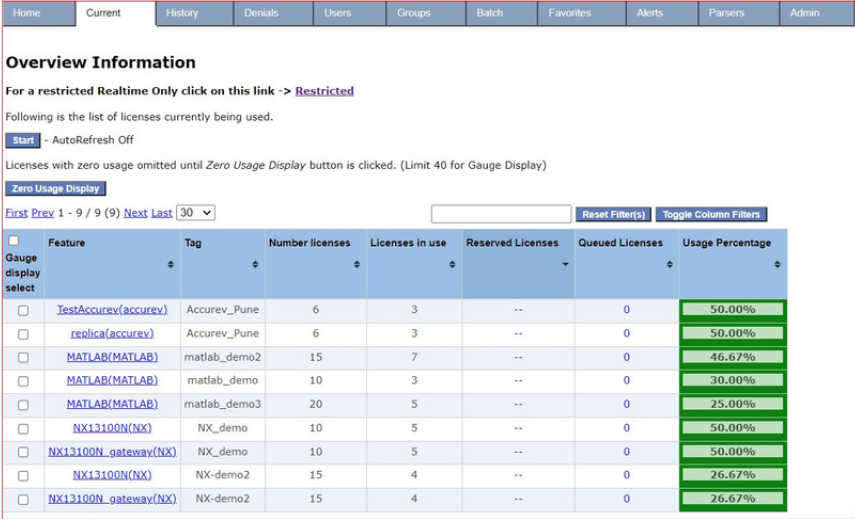
Checkouts Overview
This table shows all features currently checked out at a given Tag (port@host), User name, Feature name, Tag name, number of licenses available, and number of checked out; Also shows any licenses Reserved or Queued.
The percentage and color settings are user definable. This table can be sorted by clicking on the column heading, or filtered using the general filter box. The boxes on left are used to select features for displaying as Gas Gauges. It can auto-refresh itself if “Auto-refresh” is turned on. If “Zero Use Display” is selected, both active and non-active feature checkouts will display. This makes a great “On-Demand” report!
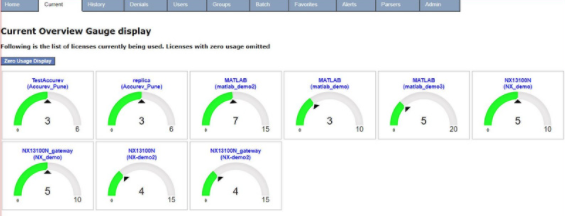
Current Gas Gauges Display
Shows current checkouts by Tool/Feature in realtime, automobile gas gauge style. The gauge is color coded as percentage of capacity.
You can see all Gas Gauges, or selected subsets of Gas Gauges by Tool, Tag, License Server, etc. Each Gas Gauge View can be saved as an “On-demand” report in the Favorites Tab or in your User Dashboard.
Every Gas Gauge includes a “blue” link to the Current Checkout Details for that Tool/Feature.
Just click on the blue and the checkout Details pops up.
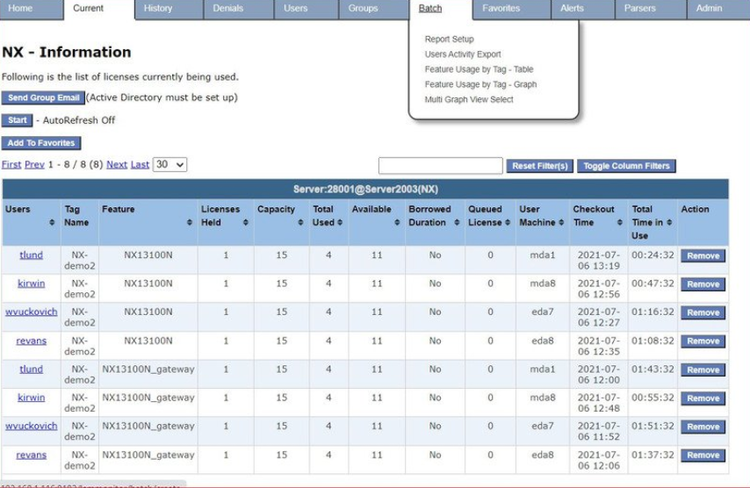
Checkout Detail by Tool
This table lists every checkout by User ID. It shows Tag, Feature name, Capacity if it is Borrowed or Queued, User Machine ID, Checkout Time, and Total Time in Use. The table can be sorted from longest checkout to shortest checkout. There are 3 ways to get this report:
By selecting the Tool from the “Current” tab dropdown, then Details
By selecting the blue Feature name in the Current Overview, then Details
By selecting the blue Feature name in the Gauge Display, then Details
The remote button allows reclaiming of FlexLM licenses if necessary. “Remove” (lmremove) requires specific FlexLM admin permissions.
24×7 Activity Reports – “Checkout Heatmap” and “Denials Heatmap”
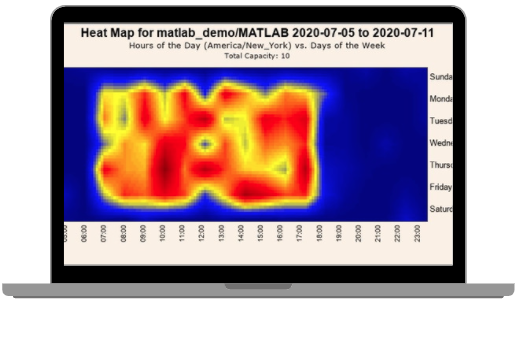
Remember, floating licenses are like books in a library. You buy 10 and they sit on the shelf. Wouldn’t it be nice to know that you never needed more than 5 books? The heatmap shows the 24×7 usage of all the activity throughout the day. The neatly organized (and vibrant) information puts into perspective the way assets are being used (checked out) or when denials are occurring.
Visualize License Checkout Patterns
Knowing usage patterns will save you both engineering time and money. Heatmaps will visually show you how licenses are used in a 24×7 graph, and when licenses are not being used.
Can you squeeze out more usage from existing licenses by letting engineers know that licenses are available at non-peak times?
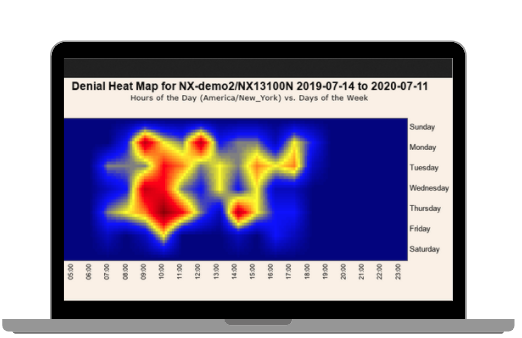
Knowing trends of usage is also important. Engineers will stay away for peak use times, tend to fill in the gaps, reduce denials and delays associated with that. LAMUM provides both Checkout Heatmaps and Denial Heatmaps.
Engineers will tend to stop hoarding licenses if they realize that other Engineers can see how long they have had a license checked out.
The denials heatmap shows the days and times when denials are occurring. These graphs are helpful for engineers to better manage their workloads by knowing when licenses are available or when they may need to wait.
Are you managing expensive licenses such as Cadence, Mentor, NX, ProE, Ansys, Matlab, among others? Your team or manager may want to get notifications pertaining to those licenses. There are automatic Alerts available in LAMUM for better engineering license management:
Contract Renewal Alert
Get an email Alert 30 or 60 days before a Contract Renewal date. Give yourself more time to plan Vendor negotiations.
License Key Expiration Alert
Get an email Alert 15 or 30 days before a License file/key expires. Ensure continuity in license availability.
License Daemon-down Alert
Get an email Alert if a License server or daemon goes down. Clearly you will want to get that server daemon back up and running ASAP.
Capacity Alert
Get an email Alert if all licenses for specified tool are checked out, i.e. Capacity is reached, and “Denials” are eminent. If you are getting this Alert a lot you may need to buy more licenses!
Long Checkout Alert
Set an Alert for critical path tools, expensive tools, or tools with high contention levels. You choose what tools and the allowed checkout time limit. LAMUM will monitor and let you know if someone exceeds that time limit. LAMUM can also send a Warning Message to that engineer, letting them know they have violated a checkout time limit. Prevents license hoarding.
License Available Alert
Alerts an Engineer when a desired tool/feature License is available for them to use. When all licenses are checked out, they don’t have to keep trying to get one.
Duplicate License Checkout Alert
Lets you know if someone has more than 1 license checked out of the same tool, at the same time.
Denial Threshold Notification
Set Denial Threshold (limit) for any Tag/feature for any time period.
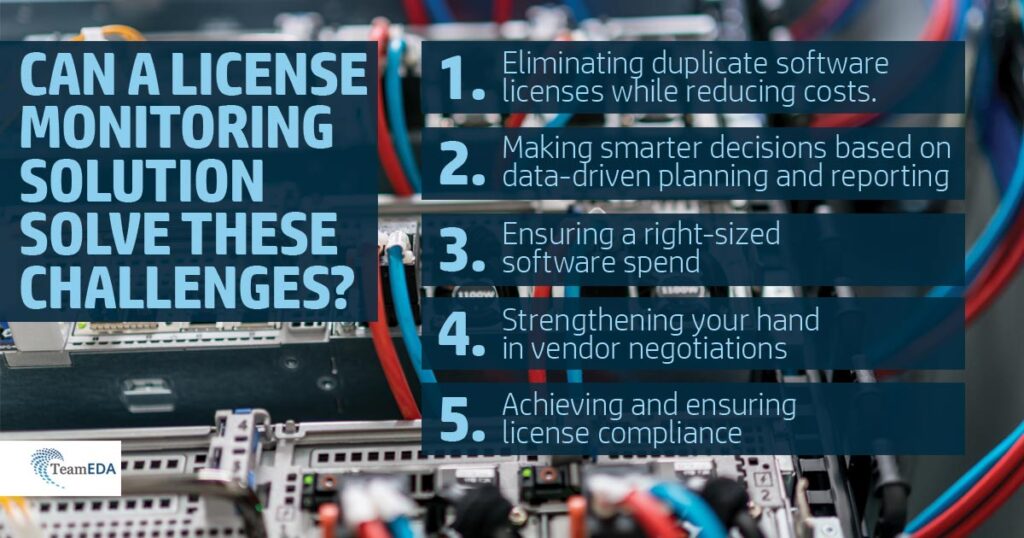
The last couple of months have been a challenge for companies big and small. Engineering departments around the world are trying to figure out the best ways to manage and contain costs and meet ever-changing demands. Many know just how expensive engineering software could be and want to make sure that educated decisions are made when purchasing licenses. Could a license monitoring solution help your company address some of the following challenges?
Eliminate duplicate software licenses while reducing costs
Smarter decision making, planning, and reporting
Ensure right-sized software spend (better visibility into over- and under-subscribed software licenses)
Stronger vendor negotiations
Achieve license compliance
While spreadsheets are great, they are no longer practical in having visibility into license ownership or renewals and maintenance contracts. Spreadsheets become quickly inaccurate (with staff and other changes) and take time to update and maintain.
It’s 10PM, and you need to use one of the engineering licenses (Autodesk, Ansys, Siemens NX, Creo or any other tool). There is an urgent need to either make modifications for a current project or design something new. Or there is a need to cut expenses quickly or adjust the engineering spend.
Who are you going to call? You don’t want to bother the rest of the team in the middle of the night (whether through text or phone calls). Wouldn’t a license monitoring tool that could identify long license checkouts help make this easier? Read our blog post to learn about understanding current checkouts.
In addition to looking at usage, you can also quickly take a look at all the current assets (renewals, POs and other documents) to make better educated budget decisions .
You learn that “Joe” is using the tool, you quickly send them an IM or an e-mail and/or ask your manager if you could checkout the license instead. You accomplish what needs to be done, while also letting the rest of the team spend time with their families.
Or a similar situation can happen for companies who are working in different time zones, where the U.S. team may be sharing engineering licenses with colleagues in APAC, EMEA or other regions. Our tool also offers heatmaps to know when different engineering licenses are used how much. This could also easily help with reporting.
LAMUM is a very useful usage reporting tool that engineering teams can use to have a more detailed view on license utilization, bottlenecks and requirements. Companies can look at the reports to see general trends as well as more specific detailed analysis.
Engineering teams have liked a number of reports such as:
Real time/current usage overview
Historical charts
License Denials
Do you know who has Autodesk, Creo and Solidworks licenses checked out and for how long?
LAMUM helps teams keep track of hundreds of licenses many large teams own. Engineering teams can also look at the best ways to share Vendor information including contacts, purchases, renewal dates with other managers. The usage information helps teams decide if they truly need more or less licenses.
LAMUM also saves companies time to avoid manually determining how many licenses are in use for any given product.