Understanding Usage Patterns & Trends

User Dashboards are easy so that anybody, any Manager, can create and maintain their own Dashboards.

How can I set up the User Dashboard?

There are certain checkout status or historical usage reports that you will want to see from time to time, on-demand, with the most current data. There are a couple of ways to access Favorite reports:

  1. Clicking on a Favorite in your browser
  2. Clicking on a hyperlink in SharePoint, GoogleDoc, Word, PDF or “WIKI”.

Tip: Edit the name of the hyperlink with a “user-friendly” name.

LAMUM makes this easy.

What about Batch reports?

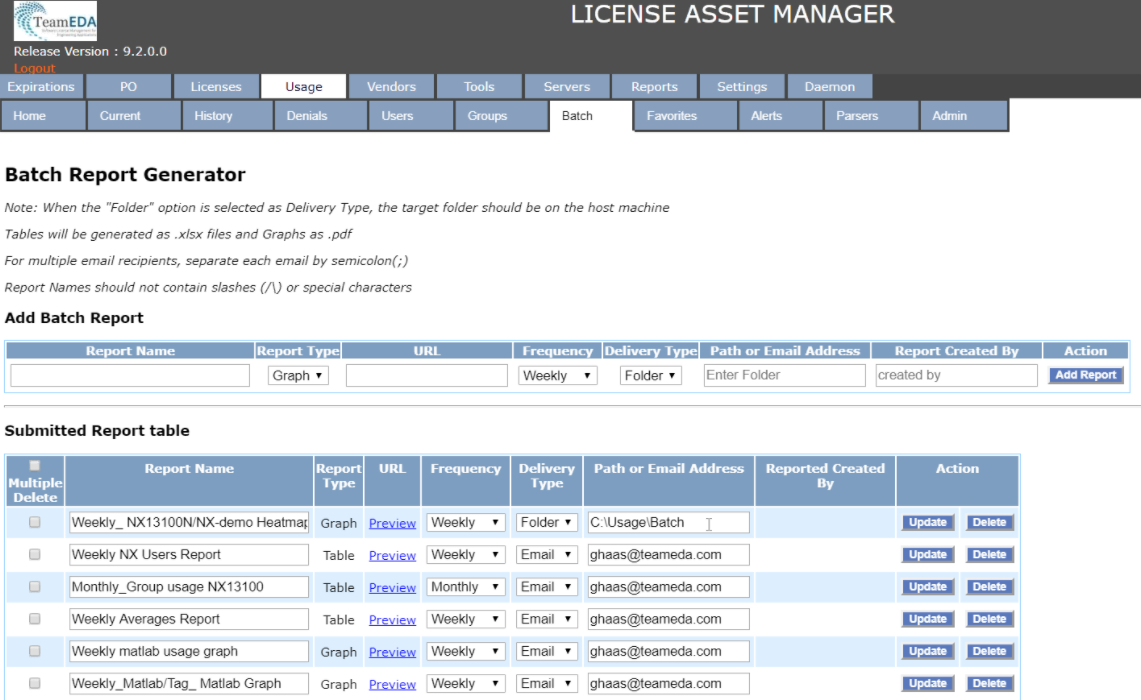
There are certain historical usage reports you may want to receive regularly: weekly, monthly, quarterly. Batch reports can be easy way to create, maintain or delete. These reports can be created automatically, at any time of day, and then either emailed to you or deposited to a specific folder. Batch reports can have user-friendly names.

How do I create Batch Reports?

The process is simple:

  1. Create the report you want.
  2. Click “Create Batch Report.”
  3. Give it a user-friendly name.
  4. Select Delivery type: email or folder. Done!

You can always go back and change the Report name or Delivery type.

LAMUM’s Batch Report Generator
Group Usage

Usage by tool or by individual is certainly important but usage by Group may be necessary too, especially if “Chargeback” is necessary.

A Group can be a:

  • Manager’s name
  • Project team
  • Site
  • Or any other way to Group engineers and monitor usage by that Group.

You will need an easy way to create and manage the Group:

  • Interactively
  • Off-line in an excel spreadsheet
  • Group using Active Directory

LAMUM allows you to create and maintain groups all 3 ways and to create group usage reports with % of total for chargebacks. Our license monitoring platform allows a flexible approach to report generation; On-Demand, URL links or via Batch reports. Contact us now for a Free 30 Day trial and you can be monitoring your licenses in under an hour.

Understanding Current Checkouts

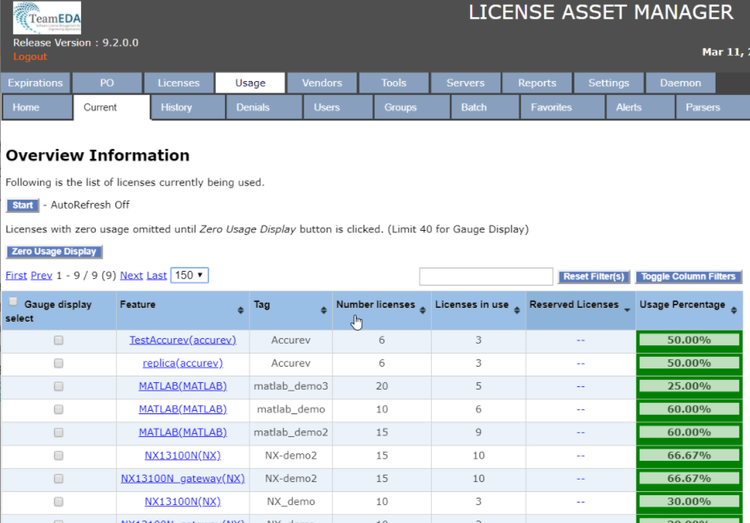
We have received questions about how do the checkout reports work and how can these be used to get the most value? Providing a dashboard with live license check-out information allows users to ‘self regulate’ license use. Which in turn, reduces the system administration burden for explaining denials to users.

What can you see under the checkout status reports:

  • How many licenses are checked out at any given time.
  • Who has a license checked out and for how long – Know if someone is hoarding or camping on a license.
  • See the Active White Paper Directory information for a User.
  • Reclaim (lmremove) a License if one is not being used and get it back into the license pool.
  • See license checkouts in realtime, updated continuously, and displayed in a table or as “gas gages”.
  • Determine average or typical Checkout time so you can set up a reasonable rule.

Extraordinary long checkouts are especially helpful for teams using expensive or high-demand licenses. Long checkouts help detect and send a warning message automatically to the User.

Long Checkout Alerts can be set for critical path and expensive tools with high contention levels, if the User exceeds a specified checkout time. You choose what tools and the allowed checkout time. LAMUM will monitor and let you know if someone exceeds the time limit. LAMUM can also send a Warning Message to the engineer, letting them know they have violated a checkout time limit. Checkout times can be calculated from the Average Checkout Time reports.

Track user behavior and stop engineers ‘reserving’ licenses whilst in long meetings. This reduces the administrative overhead associated with policing the system.

  • LAMUM provides Average checkout times, Long Checkout Alerts and User Warnings.
  • Using different colors often helps reports easier to use and look at. As such, color-coding by percentage of capacity is helpful.

Another option that companies find helpful is to have a “command center” or setting up large screens on the wall to view current checkout status continuously, across multiple tools or servers. LAMUM provides all this capability. You can read our White Paper on configuring this here.

Borrowing FlexNet & FlexLM Licenses for Homeworking

Homeworking has been in the news recently, with many employers making plans for engineers to work flexibly from any location. Using the Flexnet BORROW function allows ‘floating’ server licenses to be ‘node-locked’ to a computer/laptop on a temporary basis and therefore used away from the corporate network.

The FlexNet license software provides the ability to BORROW licenses, however, the capability must be activated by your software vendor on the license file. Vendors normally provide this functionality ‘free of charge’, it just needs to be requested.

To check whether this has been activated, take a look at your license file. Example below:

INCREMENT NX11110 ugslmd 24.0 permanent 10 CompanyName SUPERSEDE user_info=”NX M-1 Dsgn (FL)” ISSUED=03-mar-2020 BORROW=2880 ck=66 SIGN=”1234″

In this example, the maximum period that licenses can be borrowed is 2880 hours (or 120 Days). License borrowing is disabled when the BORROW parameter is absent in the license file. The license BORROW period can be altered within the Flexlm Options file, syntax and rules discussed here, restricting some users from borrowing licenses.

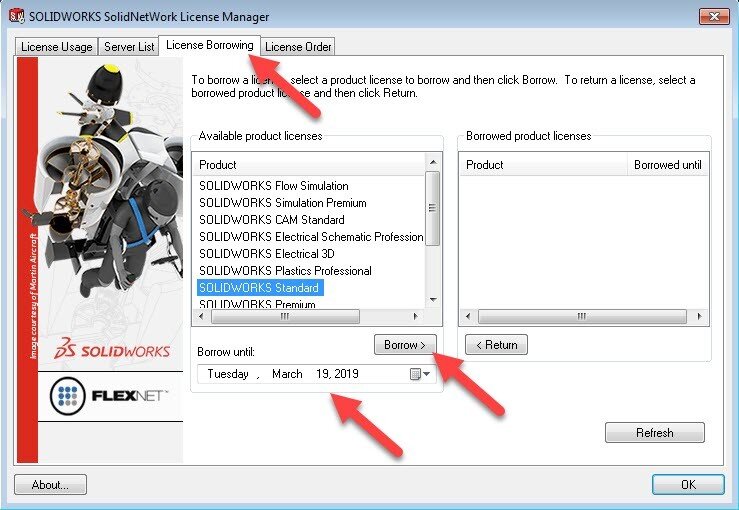
Most vendors have built an interface for the Flexlm Borrow Utility, like the Solidworks Network Manager shown above. It easily allows you to select the license FEATURE and select how long you wish to borrow it for.

Note: The computer ‘borrowing’ the license must be connected to the License Server to create the transaction. Likewise, you must connect the computer to return the license if returning before the expiry borrow period.

Specific instructions for popular software can be found via thesem links; SolidworksAutoCAD (plus other AutoDesk products), Siemens (NX and Solidedge), Ansys, PTC CreoArcGIS, etc.

Are there any other options for homeworking?

Using the BORROW command changes a flexible floating license to node-locked, therefore reducing its flexibility. Most customers will only own 70 licenses per 100 users, due to usage ratios. In a situation where you need a large number of workers to work remotely, you would be better off developing VPN access for remote workers. This would allow the effectiveness of the floating licenses to continue but remotely, this does, however, require a constant connection, something that can be difficult when relying on WiFi in coffee shops!

Using LAMUM (License Asset Management with Usage Monitoring) as a dashboard for borrowed licenses.

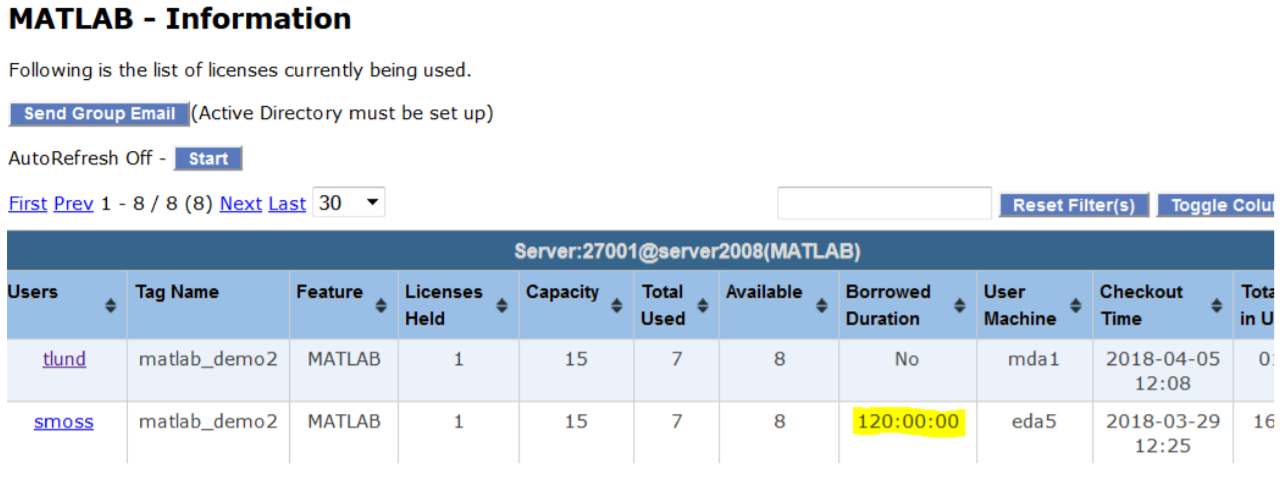
LAMUM monitors all your license servers, providing managers and administrators information on usage patterns, license ratios and whether a BORROW policy should be enabled via Options files. We can report on Users that have borrowed license files and how long the duration has been.

In the image above, we show our LAMUM dashboard, highlighting a user ‘smoss’ on workstation ‘eda5’ who has borrowed the license for 120 hours and the date on which this was activated. In our included Asset Management module we can record which users are authorized to borrow licenses.

This post was based on this LinkedIn post by Paul Empringham, TeamEDA’s European Sales Director. Paul has over 20 years experience within the Engineering and CAD/PLM software industries. He was a consultant with Siemens PLM working with many of Europe’s most innovative manufacturers. Paul has also held management positions at a number of organizations running Engineering Application teams and delivering large PLM transformation programs. Outside of work, Paul is a Level 2 ECB Cricket sports coach and enjoys skiing whenever the opportunity arises.

Knowing What You Own

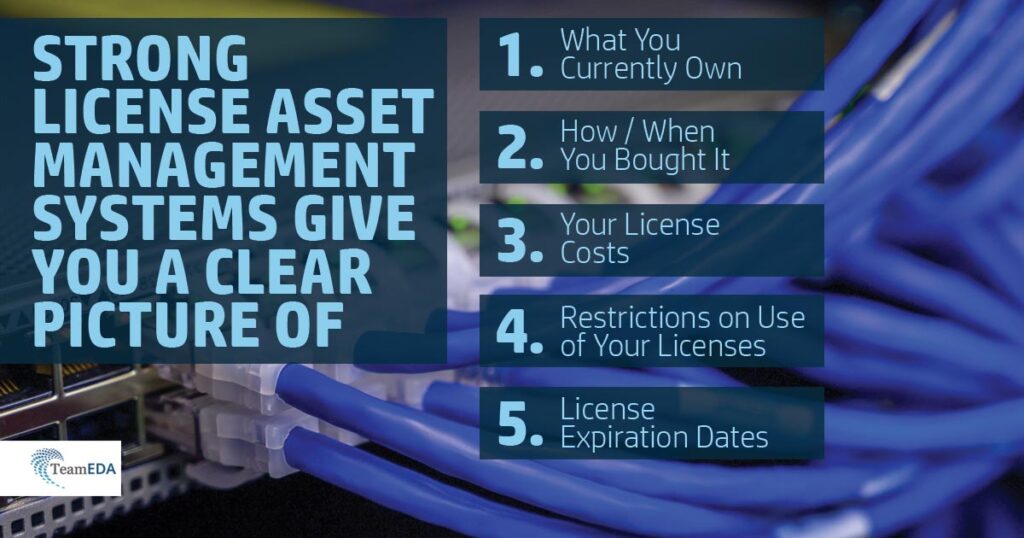
Do you have a license Asset Management system? A good License Asset management system begins by having an accurate idea of:

  • What you currently own
  • How/when you bought it
  • Its cost
  • Its restriction of use
  • And its expiration date

Once you know these, it becomes easier to make decisions in the future – for example, if you need more or less, or a different kind of License. What are the engineering business objectives? What tools have been especially helpful over the years? Are there some that the team is consistently asking for? Could they be a good replacement for current tools that are not used as much? Can you move from an expensive WAN Global to a LAN? LAN to Node-locked? Is there a way to consolidate servers? Reduce total count?

Knowing the “contractual” obligations by reviewing the licensing agreement(s) would also be considered good management practice. Many CAD Managers have never even seen, let alone read the Licensing Agreements.

A snapshot of our Usage Overview

LAMUM allows you to track CAD/CAE and other license inventory with all related information, including:

  • Vendor
  • # seats
  • PO
  • Restriction of use
  • port@host
  • Expiration date
  • Persons responsible for that Line Item.

It will also be nice to see Inventory by:

  • Responsible Person
  • By Vendor
  • By Discipline
  • By Expiration date, etc.

LAMUM provides this and is a full featured CAD/CAE License Inventory Management system. If you have more than 25 engineers and 3 Vendors you need LAMUM!

10 Ways LAMUM Can Help You

1 – Knowing What You Own

Good License Asset management begins by having an accurate idea of what you currently own, how/when you bought it, its cost, its restriction of use, and its expiration date. From there you can decide if you need more or less, or a different kind of License. Can you move from an expensive WAN Global to a LAN? LAN to Node-locked? Is there a way to consolidate servers? Reduce total count? Knowing the “contractual” obligations by reviewing the licensing agreement(s) would also be considered good management practice. Many CAD Managers have never even seen, let alone read the Licensing Agreements.

LAMUM allows you to track CAD/CAE License inventory with all related information, including Vendor, # seats, PO, restriction of use, port@host, expiration date, and persons responsible for that Line Item. It will also be nice to see Inventory by Responsible Person, by Vendor, by Discipline, by Expiration date, etc. LAMUM provides this and is a full featured CAD/CAE License Inventory Management system. If you have more than 25 engineers and 3 Vendors you need LAMUM!

2 – Preparing for Renewals

Preparing for renewal is not just waiting for the Vendor to send you a renewal Quote. You really need to prepare 30- 60 days in advance of renewal. You need to review the past period pricing, terms, and decide what your strategy will be and what your needs are going forward. You also need to review how this Vendor behaves, pricing, how they discount, Licensing types available, who are the key players, and how you want to approach the renewal.

You will need at least two months to assess your needs based on past usage, upcoming needs and trends. Only then can you get the best “deal” for your Company. LAMUM allows you to track Renewal dates and set up Renewal Alerts 60 days in advance. LAMUM also allows you to keep a copy of all Agreements and documents related to this Vendor, past purchases, all in one place, that can be shared. LAMUM is a full featured Renewal Management system. You can learn more about how we support customers maximize the results of renewal negotiations here.

3 – Preparing Budgets

At least once a year you will need to prepare and submit your CAD/CAE budget, sometimes on short notice. Generally, 100 engineers require $250k in CAD/CAE Tools. But you will need to be more accurate. LAMUM allows you to track exactly what last year costs were for all your CAD/CAE tools by Vendor and predict needs for the coming year. LAMUM allows you to track Costs by Line Item, by Vendor, and by Tool Type. LAMUM allows you to prepare a budget by Vendor accordingly.

4 – Sharing Relevant Vendor, Contact, Contract & PO Information

There is a lot of information about a Vendor that you need to know, and sometimes share with colleagues- contacts, terms, discount rates, list prices, address, phone numbers, email addresses, associated contracts and documents (NDA, Perpetual License Agreement, Subscription License Agreement, etc).

Best practices suggest that you centralize and share this information, rather than have multiple excel spreadsheets, copies of contracts in multiple files, and numerous Vendor business cards floating around. Our License Asset Manager functionality allows you to centralize and share all related Vendor and Reseller information.

5 – Understanding Current License Checkouts

Checkout Status

You need to see how many licenses are checked out at any given time. You need to see who has a license checked out and for how long. Color-coding by % of capacity is desirable. You need to see the Active White Paper Directory information for a User. You need to know if someone is hoarding or camping on a license. You need to be able to reclaim (lmremove) a License if not being used and get it back into the license pool. You need to be able to see license checkouts in real-time, updated continuously, and displayed in a table or as “gas gages”. You many even want to set up large screens on the wall to view current checkout status continuously, across multiple tools or servers. LAMUM provides all this capability. Here is a White Paper on setting up a “Command Center” look/feel.

Extraordinary Long Checkouts

As stated above you need to know if there are long checkouts, especially on expensive or high-demand licenses. You need to be able to determine average or typical Checkout time so you can set up a reasonable rule. It would be nice if long checkouts could be detected and a warning message sent automatically to the User. LAMUM provides Average checkout times, Long Checkout Alerts and User Warnings.

6 – Understanding Usage Patterns & Trends

On-Demand Reports

There are certain checkout status or historical usage reports that you will want to see from time to time, on-demand, with the most current data. You will want to see those reports by clicking on a Favorite in your browser, or by clicking on a hyperlink in SharePoint, GoogleDoc, Word, PDF or “WIKI”. You will want to see the hyperlink with a “user-friendly” name. Creation of these “User Dashboards” must be easy so that anybody, any Manager, can create and maintain their own Dashboards. LAMUM provides such capability.

Batch reports

There are certain historical usage reports you will want to get regularly: weekly, monthly, quarterly,… You will want these reports to be created automatically, in the middle of the night, and then either emailed to you or deposited to a specific folder. Batch reports need to have User-friendly names. Batch reports must be easy way to create, maintain or delete. LAMUM provides this. The process is simple: create the report you want and click “Create Batch Report”, give it a user-friendly name, and then select Delivery type: email or folder. Done! You can always go back and change the Report name or Delivery type.

Group Usage

Usage by Tool or usage by individual is certainly important but usage by Group may be necessary too, especially if “Chargeback” is necessary. A Group can be a Manager’s name, a Project team, a Site, or any other way to Group engineers and monitor usage by that Group. If you do require usage by Group you will need an easy way to create and manage the Group. Can you create the Group interactively? Can you create the Group off-line in an excel spreadsheet? Can you create the Group using Active Directory? LAMUM allows you to create and maintain Groups all 3 ways, and to create Group usage reports with % of total for Chargebacks.

7 – Knowing What is NOT Being Used

We tend to focus on what is being used, by whom, how much, etc. and that is important. But it is equally important to know what is not being used. There may be tools you bought and paid for that are not being used and that is a waste of money. LAMUM allows you see all features (tools) at any given port@host that were not used (checked out) in a specified time period. This information can be reviewed periodically and you can determine if it is possible to save some money by getting rid of it. The information may also be useful to the Engineering Manager who might be interested to know if certain tools are not being used! The Manager may want to conduct training on that tool,  or access performance by an Engineer or Group. The LAMUM “Zero Usage report” makes a good monthly or quarterly Batch report.

8 – Avoiding Excess Purchase “Traps”

Managers may jump to conclusions that they need to buy more licenses if someone comes along and says “we need more licenses” or “I can’t get a license” or “I keep getting denied”. It is bad management practice to just go out and by more licenses based on hearsay. Most likely there is plenty of capacity if usage is distributed over the full 24×7 period, and as long as engineers aren’t hoarding licenses. Is there a way engineer demand can be shifted if they can see current usage patterns, if they know when Denials might occur?

Best practices suggest that a 5% probability of “Denial” is acceptable. LAMUM will show you the current probability of Denial in the Concurrent-use reports. It will also show you the Concurrent-Use patterns for 24×7, M-F 8-5, or for any skewed time period. Long Checkout Alerts will also help to reduce hoarding and prevent excessive purchases of very expensive tools. LAMUM will provide you the tools to look and verify if Licenses are or are not available, and why. LAMUM will give you the information needed to justify License capacity changes at renewal time.

9 – Receiving Relevant Alerts

Automatic Alerts for such things as “Daemon-down” will help you maintain License availability. Alerts like “At Capacity” will help determine if/when you are running out of Licenses. If you are getting a lot of “At Capacity” alerts maybe you do need more licenses! “Expiration Alerts” will also help to assure License availability by giving you enough time to renew and mount a new License key. Having a License key expire can be very embarrassing! Setting the Alert to 60-days should give you adequate time to analyze your needs, negotiate with the Vendor, and process a renewal. If you have expensive licenses or licenses with significant contention, the Long Checkout Alert will be of value. LAMUM has all these Alerts, if you want to use them.

10 – Managing Expensive Company Licensed Assets Using “Best Practices”

There is no question that CAD/CAE licenses are expensive company assets. As such they need to be managed properly. A good estimate of cost is $250k per 100 engineers. If you can save just 10% of those costs you could be saving your company many thousands of dollars, and you will look like a hero! Moreover, you owe it to your company to get the most out of the licenses you own, and to assure maximum License availability. That is just good business management. LAMUM will help you achieve this goal, and will give you the information you need to justify more or less Licenses. LAMUM will insure you are capturing and sharing the important and right information for best practices.

Conclusion

It’s not about whether you should buy TeamEDA’s LAMUM. It’s a matter of what you lose by not buying LAMUM. You owe your company an effective way of managing expensive company assets. You owe it to you company to run lean, and save money. You owe it to yourself to be seen as an innovator!

LAMUM’s Return on Investment

Most companies try to achieve a return on their investments. So why is LAMUM a really good investment? The ROI of a LAMUM solution depends on a number of factors such as: number of engineers, cost for CAD/CAE tools per year, price of LAMUM per year, and savings that LAMUM offers. Typical savings are in the 15-25% range. Download our whitepaper to learn more about ROI calculation.

Here are 6 ways LAMUM can save you money:

  1. Knowing accurately what you have before you buy more. If you already own 10 licenses of a tool that costs $10,000 each, wouldn’t it be important to know that? LAMUM helps you manage current inventory of both floating and node-locked licenses.
  2. Improved license use efficiency. Clearly the more efficiency there is in license usage the fewer licenses you will need. Does your team really need another $10,000 license, or can your team adapt working practices to get more efficiencies from the existing licenses?
  3. Being better prepared to negotiate with your Vendors. Negotiating with Vendors is an important aspect in managing expensive CAD/CAE tools. Every Vendor is different in terms of discounts, negotiating tactics, personality, etc.  With LAMUM, you can track vendor behavior, “giveaways”, discount rates, terms, who is who, who has approval authority, etc.
  4. Tracking Usage. Knowing usage patterns certainly will save you money. LAMUM delivers reports down to user and/or group level usage, with additional innovative reports such as average checkout time and percentage concurrency charts providing a complete view.
  5. Using the Zero usage reports. Identify tools that are not being used. Can they be dropped and save that cost accordingly?
  6. True Denials. A common mistake for management is to run out and buy more licenses because an engineer is reporting he/she can’t get a license. LAMUM allows filtering Denials based on type of Denial.

All this adds up to 20% savings per year! Indeed, if you are already monitoring usage in some way, even if just “basic usage”, you are getting some savings, but probably half of what you could using LAMUM. You can learn more about how LAMUM compares to DIY or home-grown solutions here.

Do You Know When Your License Renewal Dates Are?

Would knowing license renewal dates in advance be helpful? With our expiration alerts, knowing 30 or 60 days in advance, when a license is coming up for renewal gives you time to:

  • Analyze your needs based on actual, average, trends, and Denials, and
  • Prepare your negotiating position with the Vendor. Being well prepared could save you a lot of money! This will also help you establish priorities.

Are you responsible for managing CAD inventory, maintaining Vendor, Contacts, and renewal information, generating reports on demand, setting up and maintaining User Dashboards, setting up Alerts and Batch Reports, managing FlexLM daemons, preparing recommendations for renewals, managing Feature names (aliasing), etc. The task list can be quite extensive and is there a way to make it easier to manage this information? A tool like LAMUM can help you save time and money, with many of our clients saving an average of 20% on EDA software).

What are the applications you would like to monitor? Are there specific ones the engineering team is constantly asking about additional licenses? Are there other software products that the team does not use as much?

Would you also like to prove the value of buying additional CAD / CAE software? Without reporting, you may lose out on additional savings without using a monitoring tool.

What about budget adjustments? Would not it be nice to be well prepared for the budget season?

The more value you can get out of LAMUM by knowing what you own (License inventory management), improving license usage efficiency, by proactively managing renewals, by preparing better for your renewal negotiations, by improving license uptime and availability.

Our reports can show you Renewals with the following information:

  • Expected renewal cost by Vendor for any time period
  • Expected renewal cost by Application/Tool
  • Expected renewal cost for all Vendors for any time period

LAMUM has great functionality and value. Of course, the more functionality you use, the greater the value. The cost of LAMUM is the same regardless of how much functionality you use.

Make Your License Renewal Negotiations Easier

Are negotiations stressful? Do you have a limited budget and are trying to meet everyone’s software needs? If the estimate is overestimated, the company has paid too much up front, but if the consumption is underestimated, the company could face unexpected costs in the future.

Negotiating with Vendors is an important aspect of managing expensive CAD/CAE/+ tools. Make sure you have the advantage of having the data to negotiate on software purchase and renewals. Every Vendor is different in terms of:

  • Discounts
  • Negotiating tactics
  • Personality

So, of course, the side that gets the best “deal” is the one that is better prepared. If you have important information, you will be able to have more negotiation power.

Vendors often use a variety of historical discounts, vendor behaviors, ‘giveaways’ plus techniques for negotiating future discounts, feature remix deals, multi-year ramp up deals, etc. TeamEDA are specialists in renewal planning and can help to ensure that you understand the patterns in this type of behavior.

What About Renewals?

It is more than just waiting for the Vendor to send you a renewal Quote. You really need to prepare 30- 60 days in advance of renewal. You need to review:

  • Pricing (past and proposed)
  • Terms
  • Decide what your strategy will be and
  • What your needs are going forward.
  • How this Vendor behaves
  • How they discount
  • Licensing types available
  • Key players
  • Approach to the renewal.

You will need at least 2 months to assess your needs based on past usage, upcoming needs and trends to get the best “deal” for your Company.

TeamEDA’s LAMUM (License Asset Management and Usage Monitoring) is the only industry toolset to combine asset management (tracking vendors, contacts, contractual documents, PO’s, etc.) with a proprietary algorithm to ensure a 3 point check on actual license usage providing a holistic view of license assets. This information can then be used to inform decisions for purchases and renewals, often saving our customers over 20% annually.

LAMUM allows you to track renewal dates and set up Renewal Alerts 60 days in advance. LAMUM allows you to keep a copy of all Agreements and documents related to this Vendor, past purchases, all in one place, that can be shared. LAMUM is a full featured Renewal Management system.

Why Accuracy is Crucial for License Compliance & Cost Reduction

Whoever said, “Throw caution to the wind, we will get through it OK” obviously hasn’t met the compliance and audit teams from the biggest global software vendors. It is fair to say that software licensing is a bit of a science in itself or as many senior management teams would say, “… a bit of a Dark Art“, this is due in part to the increasing trends in subscription-based, bundle arrangements, token-based, consumption-led and many other licensing specific models.

Even the most hardened Software Asset Manager can get in a bit of a spin when longstanding Enterprise agreements need to be renegotiated to consumption-based models, as often the data just doesn’t exist to make a suitable forecast estimate. If the estimate is overestimated, the company has paid too much up front, as will the contract allow for underutilized rollovers? If the consumption is underestimated at the renewal meeting the company could be faced with unexpected true-up costs.

It would appear that software vendors are moving away from a focus on software piracy, to a recognition that organizations have the right intentions to license correctly, but simply don’t have the correct processes and oversight in place to ensure they work within their agreed-upon contractual usage.

At TeamEDA we see two common (but avoidable) mistakes that occur regularly in all enterprises, small through to global:

  1. No single view of entitlements & contractual requirements. Companies are run at a much higher velocity than in recent years, the churn of staff in management positions sits at around 1.5-2 years. Which often means, when new licenses are purchased or renewals negotiated, it is a new manager in place who no longer has access to the previous negotiation history of contractual entitlements. Contractual documents, discount agreements, PO’s, payment schedules, geographic entitlements can all sit-in different IT document systems making it difficult to build a complete picture, or worse, be locked/lost when a manager leaves the company.
  2. Estimates are used for usage reporting, strategy trends or chargebacks. Obtaining accurate usage information for Engineering Applications (CAD, FEA, CAx, EDA, ALM, PDM, PLM, MBSE, etc.) is a little more complex than Business Applications as traditional SAM tools do not monitor FlexNet/Port@Host licensing. Therefore analysts may use a combination of the number of users in an Active Directory group cross-referenced with the maximum numbers in a license file. We often hear of Excel spreadsheets used to build an estimated usage profile, based on application managers intuition. More mature companies will use in-house scripts or purchase a solution to monitor the license daemons. Monitoring license servers is a complex business, at TeamEDA we have found in-house scripts and competitor tools interpreting check-out log files incorrectly and overestimating usage by up to 150%. If you estimate data you will overspend or underspend, either way, it is not being cost-efficient.

When faced with the increasing threat of software audits, ensuring you have an accurate compliance overview is essential. You must ensure you understand your license contractual requirements, such as not utilizing geo-located licenses across international borders. Which can often get forgotten, for example, when a German license server has 40 spare licenses and the Indian server is suffering constant denials, sharing licenses from Germany to India would resolve the situation. But this would also lead to a non-compliant license situation, an easy mistake to make at system admin level and an event the auditors will look for immediately.

TeamEDA’s LAMUM (License Asset Management and Usage Monitoring) product is the only industry toolset to combine asset management (tracking vendors, contacts, contractual documents, PO’s, etc) with a proprietary algorithm to ensure a 3 point check on actual license usage providing a holistic view of license assets. This information can then be used to inform decisions for purchases and renewals, often saving our customers over 20% annually.

Software license audits are feared across the industry, but with the right planning and processes in place to ensure you have a live and accurate picture of your license assets and usage, the level of risk is substantially mitigated.

This post was based on this LinkedIn post by Paul Empringham, TeamEDA’s European Sales Director. Paul has over 20 years experience within the Engineering and CAD/PLM software industries. He was a consultant with Siemens PLM working with many of Europe’s most innovative manufacturers. Paul has also held management positions at a number of organizations running Engineering Application teams and delivering large PLM transformation programs. Outside of work, Paul is a Level 2 ECB Cricket sports coach and enjoys skiing whenever the opportunity arises.

Do You Know What Licenses You Have?

A crucial part of successful budgeting and cost reduction for engineering licensed assets is knowing what licenses your organization has. Would you be able to easily know and report on the type and number of licenses you have? Is your spreadsheet with that information growing too large and you are looking for an easier solution? Our License Asset Manager with Usage Monitoring can help you make this process so much easier.

In addition to making systems more effective, asset management is also very important at this stage for compliance with Software vendor contracts. Companies must have a strategy for Compliance Audits (Software Vendors) and Quality Audits such as ISO9001. An easier compliance process helps to ensure that specific licenses are only used in certain countries (WAN/LAN) or restrictions on license borrow features.

Knowing accurately what licenses are used involves understanding both the number of licenses as well as features and add-on purchases. A manager thus needs to understand information about:

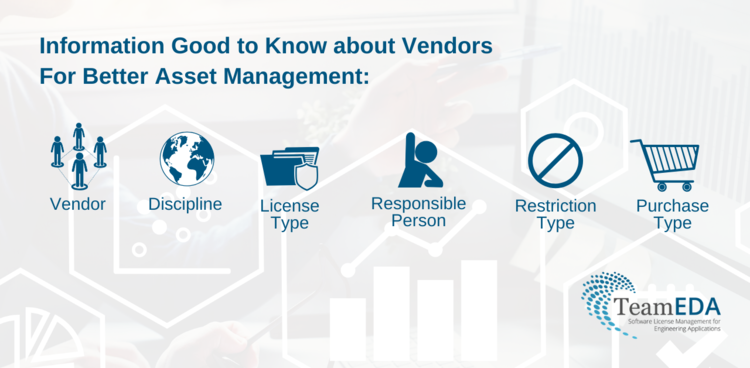
  • Vendor
  • Disciplines
  • License Type
  • Purchase Type
  • Restrictions on Use
  • Responsible Person for complete asset management

In addition to the general knowledge about licenses, usage data is crucial as well. While many tools may have some of this built-in, many vendor-provided tools are very limited. Tools like LAMUM are thus crucial in terms of their extensive reporting of both historical and current Checkout information and trends. Learn more about LAMUM’s best-in-class functionality and how it can help you better organize and optimize your licensed assets here.