How Does LAMUM Gather Data?

You may be wondering how does LAMUM gather data. Here we discuss how LAMUM collects data for Inventory/Asset, Renewal and Vendor and Usage data (for the various license types).

Inventory/Asset, Renewal and Vendor data:

Quickly import (anything in an Excel spreadsheet). Manual entry also is fast and easy. GUI is very intuitive and it takes less than 5 minutes to enter a Line Item, including daemon and license server information. For faster or repetitive entry the “Clone” command is useful.

Usage Data (depends on License Manager type):

For FlexLM licenses, there are two ways. First, “lmstat” collects checkout information every 10 minutes. This provides Current Checkout Reports (Overview Table, Gas Gauges, and User Details). User Detail reports have Active Directory link for User ID, and a “Remove” button is available to reclaim a license and move it into the pool.

Flex Debug Logs provide Denials and Short Checkout information. Log files are parsed daily. Denials Report available numerous ways – Denials Detail by daemon, Comprehensive Denials Detail across all daemons, Denials by user, Denials by Group, Denials by Tool Graph, and Denials Heatmap. Denial Details can be filtered by Denials Code to get True Denials only..

Reprise, DSLS, LM-X have similar commands to Flex to gather data every 10 minutes. Reprise and DSLS can also report Denials by parsing the related Debug Log.

Sentinel RMS, Sentinel HASP, Altium, Atlassian, Windchill all have a Checkouts Log file, which can be parsed daily to collect historical usage data, for historical usage reports.

Have further questions? Our Support team would be happy to answer.

Complimentary Data-Driven AutoDesk Named User Transition Planning

Are you faced with higher AutoCAD license fees due to being forced to the Autodesk named-user license model?  Before migrating to Autodesk named-user licensing, fully understand your AutoCAD license usage with LAMUM and consider potential savings.

You are probably aware that on August 7th, 2021, Autodesk will enforce a transition for all software users to a new Cloud-based Named User licensing system? Before this date, Autodesk customers will need to analyze and evaluate how to best renew existing perpetual licenses prior to this cutoff date. With 20% increases in maintenance fees, there are several options open, resulting in very different cost profiles over the next 5 years.

Our team is also offering a complimentary “transition planning” analysis and consultation, which includes the following:

  • Usage Ratios – This will help you further understand how many licenses you will need for the future. Do you need to purchase more or potentially reduce numbers?
  • Levels of Utilization – Learn about how your users are utilizing AutoCAD and other tools, both live use and historical analysis. Could there be a lower-cost alternative for low utilization users
  • Identification of power users – Identify the power users in your organization, possibly to form a working group to evaluate the changes.
  • Additional reports and findings – Track idle periods and discover details of license denials.

Contact us today to learn more and see if our team can help provide complimentary feedback for when you are ready to make a decision.

Please see more information from Autodesk.

How Does the Engineering Team Use your EDA Software?

With many teams currently working remotely, do you know how the team is using the EDA software and are there ways to be more efficient?

Historical data and batch reporting are key for decision making. How do engineers use software and tools? Are there particular times when the tools are used more than other times? Are there specific licenses that are used more frequently than others? Does it feel like there are times when there are not enough licenses?

In medium to large organisations network/floating licenses are used as the most cost-effective method for user provision. However, without the use of FlexLM Option files, these licenses are typically available for all to use, on a ‘first come first served’ basis. Engineers are inquisitive in nature and like to test out new features in the tool, looking for efficiency gains in the development process.

Managers need to understand the concurrent use of features, but maybe, more importantly, the spread or heatmap use of tools and features over a week. Having a heatmap and historic reports helps see the usage patterns over time.

Maybe meetings could be modified to get greater license efficiency across the department and avoid buying another 10 licenses? Could project managers work with engineers to use their time most effectively to ensure the best usage of licenses? Could licenses be moved from one server to another? What about how could FlexLM Options files be used for greater efficiency?

License denials are critical to a business. Many companies rush to buy more licenses before analyzing if there is a true need for more licenses. Learn more about how license denials work.

It is also important to understand what the team is NOT using! CAD and development software has been in many companies for over 30 years, with purchases often preceding the current management team. This means that there could have been shifts in staffing changes (number of licenses) and types of tools required.

At TeamEDA we often see companies that have two or more sets of CAE, CAM, CFD, etc. toolsets, where a new development process has superseded the requirement for the original software, but the company lacks the confidence (or even knowledge of existence) to stop paying for these tools.

This is the area where the most money can be saved, understanding usage and proactively managing preferred tools, whilst pruning those that no longer offer value to the company – this is License Asset Management, the strength of our LAMUM product. LAMUM contains the most complete set of reporting tools, either current, historical or batch reporting, many with email alerts.

Challenges with Home-Grown Code Solutions

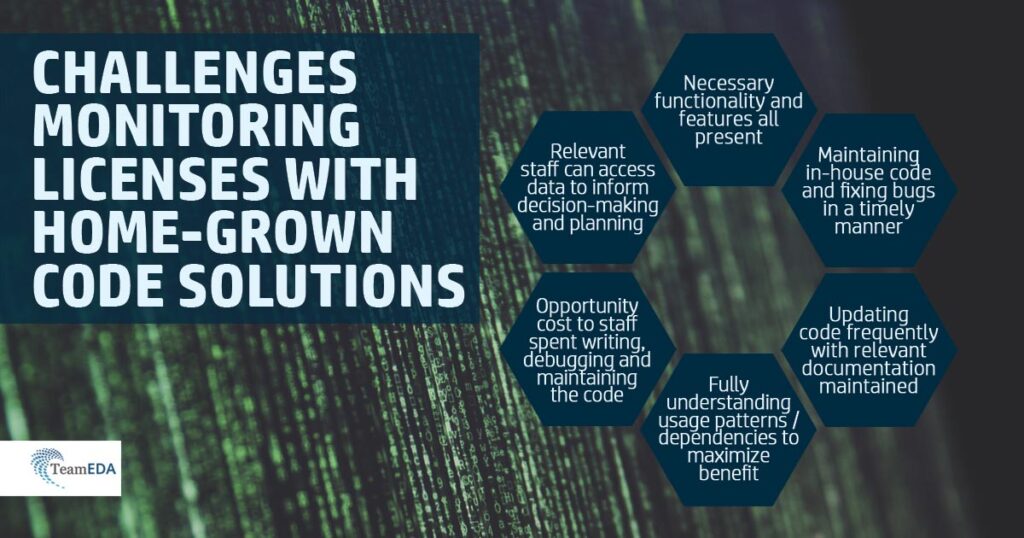
Many companies have had specialists write home-grown code. It was was written long ago and has been in use for some time. Although limited, perhaps out of date, it is installed and working, and probably doesn’t cost anything. But what are some considerations?

  • What functionality are you missing and how important are those features?
  • How many are using the home-grown code (getting reports)? Should other people be using it and if so, why aren’t they using it?
  • Can anyone support the code? Are there bugs? What is the risk of not having someone around to maintain the code?
  • When was the last update? Is there any documentation? If so, is the documentation up to date?
  • What are the Opportunity costs of having someone work on this code, vs. doing other things more important? We assume maintaining license monitoring code is not why they were hired. We assume there are important projects they could be working on.
  • Are you realizing the greatest possible benefit, like saving the most possible, like fully understanding usage patterns an dependencies? If not, what are you missing?

You can learn more about how home-grown and DIY solutions for license monitoring compare to LAMUM in our White Paper on the topic.

Challenges in License Management

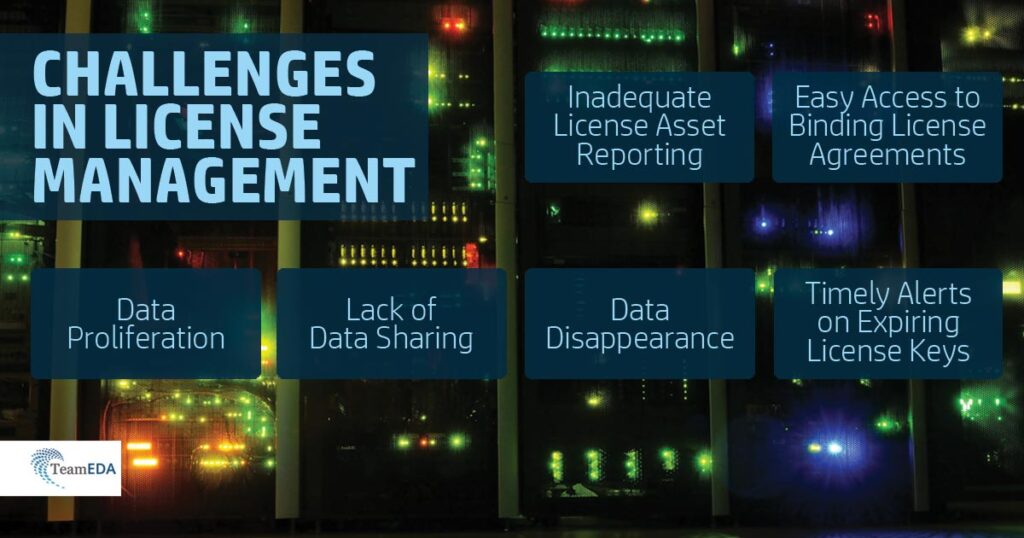
Challenges in managing license assets arise in different ways – data proliferation, lack of data sharing, data disappearance, timely alerts on expiring license keys, inadequate license asset reporting, and access to binding License Agreements.

Data proliferation results from the shear amount of data related to managing licenses: Vendors, Resellers, Contacts for each, Internal Users, License Agreements (which could be up to 3 per Vendor- Perpetual License Agreement, Subscription License Agreement, Maintenance Agreement), PO’s, License keys, Expiration dates, License Servers, etc.

To compound this, there are many people (3-5) who need this kind of information, so inevitably each creates and maintains their own spreadsheets, Outlook files, and paper folders. Not surprisingly, the information is seldom in sync. More often, there is no sharing of this information.

Reality hits hard when someone who has built these spreadsheets and files, leaves the company. It is entirely possible that a company’s most critical license asset information disappears overnight.

Expirations may be critical if a license key shuts down, shutting down a whole project, but it is just as important knowing when to start “renewal” negotiations with Vendors. If one waits too late, the Vendor has a decided advantage. If one starts earlier, one has the advantage.

How quickly could one prepare a management report on:

  • Current License inventory
  • Maintenance and Renewal status
  • Cost estimates for renewals
  • Expiration dates for all time-based licenses
  • License Server inventory
  • Contacts for Vendors
  • PO History by Vendor, etc.

No doubt reports of this kind can be prepared given enough time and effort, but if they are needed immediately, well it might not happen.

Subscription Licenses – What Are They & Their Challenges?

In the past, obtaining engineering software applications meant a purchase of a perpetual license, with annual maintenance, which is typically 20% of purchase cost per year. This is still the most popular approach.

Subscription Licenses

However, Vendors are pushing more time-based licenses, called Subscriptions. Some even provide the ability to “remix” license counts quarterly, or semiannually.

An off-shoot of this is the “Debit Card” wherein the Company can use application software by the hour/day, and actual time/cost is deducted from the Debit Card. This proves to be very expensive and is losing interest.

Tokens

Application “Tokens” is another approach whereby the Company buys a package of tokens, each application requiring x number of tokens to run. While those tokens are in use, they are out of the pool. Tokens are controlled with a time-based license.

Companies find the Subscription approach appealing even though it may cost more over a 5 year period than a perpetual license – why?

  1. Subscriptions use expense dollars, which is sometimes easier money to come by
  2. Provides flexibility so as needs change, the license mix can change, and
  3. Can be more easily charged to a project or program.
The Challenge

The downside of Subscriptions is license administration and expiring license keys. Time-based licenses, by definition, expire and when they expire, they shut down, even if in the middle of an important project. Therefore, keeping close track of license keys and expiration dates is becoming more critical.

Current Challenges: Expense of Engineering Software

There must be a better way to keep track of expensive electronic or mechanical engineering software licenses and associated resources. Engineering software is very expensive and is essential for development and on-time project completion.

So why is there so little management attention, or control systems in place for these assets?

Today’s manufacturing firm can spend millions of dollars on software tools for electrical and mechanical engineering. Designs are becoming so large and so complex that it is virtually impossible to develop these products without engineering software tools.

Moreover, demand for shorter product time-to-market drives accelerated R&D techniques, and demand for higher quality drives precision R&D techniques. Engineering application software is mandatory, and the tools are not cheap! It is not uncommon to pay $50,000 for one license.

Gartner estimates manufacturing companies spend 1-1.5% of Annual revenues on product development software. This amount may be even higher for some electronics companies who depend on very expensive applications for design, synthesis, verification, physical layout, etc.

Manufacturing companies spend a lot on CAD/CAE, 2D/3D drawing, FEA, CFD, and similar software. Even though mechanical application design software may cost less per seat, there are typically many more engineers.

The net is that electrical and mechanical companies spend about the same—a lot of money of engineering software!! The VP of Engineering is typically the person with budget responsibility, but there are usually others in the company also interested in these assets: CIO, Finance, IT, etc.

Is it time to start looking for cost savings across your organisation?

We are confident savings can be found within the Engineering Software contracts. If you are an Engineering leader, ITAM or SAM professional, contact TeamEDA today to discover how to identify and negotiate large savings.

IT Chargebacks for Engineering Applications

Chargebacks for IT software & services can surprisingly be an emotive topic for managers in most organizations. Issues can be summarized as:

  • Typically Engineering Directors feel they are hit with escalating costs on a yearly basis, with very little transparency as to how these were calculated.
  • The IT functions understand their staffing and project costs but lack the information to apportion license usage to individual users or groups, resulting in a single Engineering Software cost applied to all users.
  • The IT analysts feel they waste too much time calculating costs for licensing. Especially if staff leave or there are new starters. How do you pro-rata the costs?
  • Users of expensive simulation software (FEA, CFD, HPC) with many different add-on modules, that are only ever used by a small number of specialists, end up being charged the same rate as an occasional user (Manufacturing Engineer) who simply accesses the PLM tool a few time a week.
  • Heads of Departments would prefer to see regular/monthly running totals of costs to ensure they are tracking to budget.

These issues, unfortunately, cause conflict within organisations and sometimes ongoing distrust between leaders. The main culprits are CAD, CAx, FEA, EDA, PLM, AR/VR where licenses are typically floating and network-enabled instead of named-user, toolsets which Business level SAM (Software Asset Management) solutions cannot track. With the recent trend in token-based licenses (Altair, Siemens NX, Simcenter, etc) an effective usage tracking tool will become essential to track to a much lower, more granular level.

However, this is entirely avoidable and companies following software asset management ‘Best Practices’ are able to provide full transparency by reporting IT costs down to user-level, even providing variable costs based on the actual usage of software tool modules.

I will show you how we deliver this capability within LAMUM (License Asset Manager with Usage Monitoring).

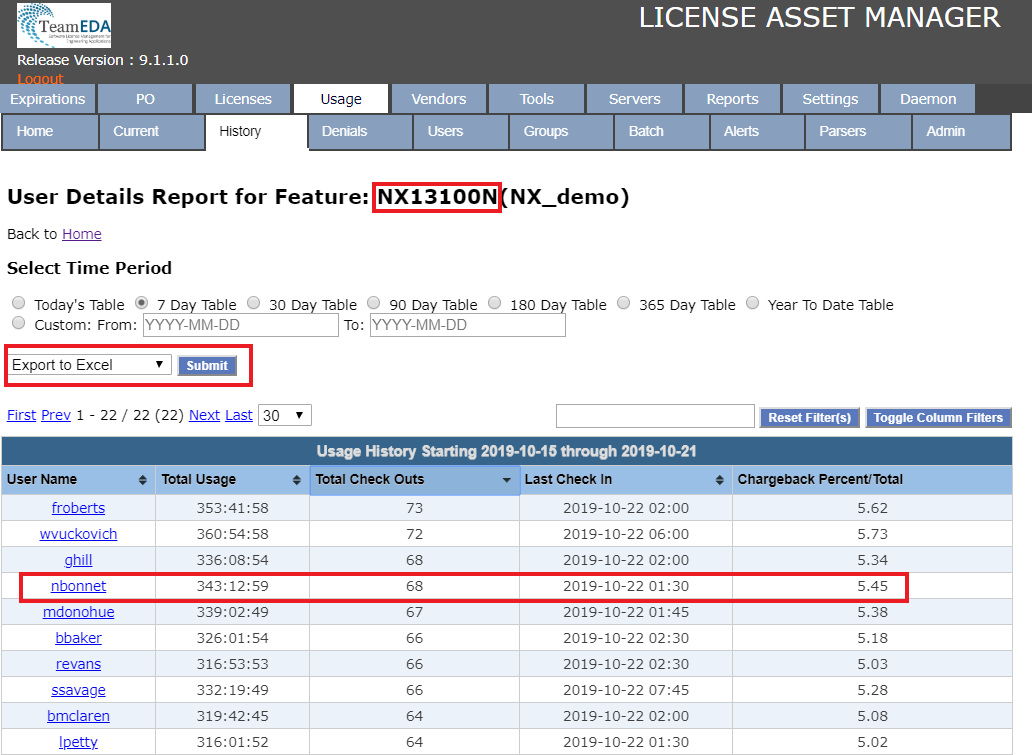
The image below (Figure 1) shows a User Detail report for the Siemens NX feature – NX13100N on the license server NX_demo. Here you can see how we automatically provide a chargeback percentage. Please remember this information is provided for every feature and for every license file that is tracked, allowing for a completely granular IT chargeback process.

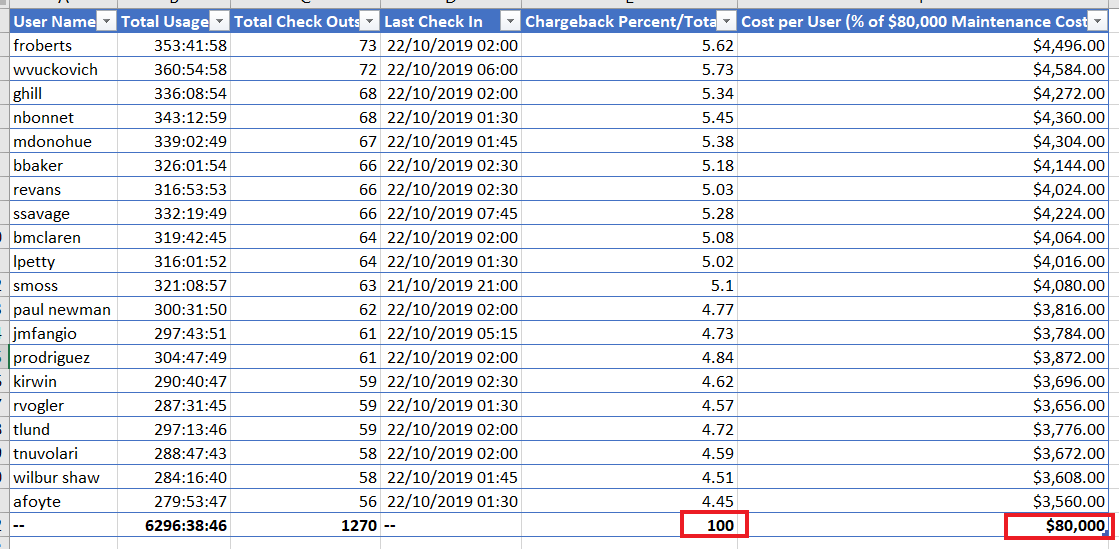
All of the reporting data from LAMUM can be exported to Excel at the click of a button or via a batch report (email or file-based) which could allow IT departments to generate usage and cost figures on a daily, weekly, monthly, etc. basis.

The above image shows the data once exported to Excel. I have added the last column to calculate the individual’s cost by dividing it by the annual software maintenance cost for feature NX13100N.

Please remember, that these costs can be calculated (and automated) for all license features, across all license daemons. As an example Design Engineer user “bbaker” uses Siemens NX (CAD), Teamcenter (PLM), Mentor (EDA), Ansys (FEA) and IBM Doors (Requirements) products on a daily basis, these are all products we track within LAMUM, costs can be automated per user on a daily basis. We think the budget holders will be very impressed with this level of transparency over costs!

This post was based on this LinkedIn post by Paul Empringham, TeamEDA’s European Sales Director. Paul has over 20 years experience within the Engineering and CAD/PLM software industries. He was a consultant with Siemens PLM working with many of Europe’s most innovative manufacturers. Paul has also held management positions at a number of organizations running Engineering Application teams and delivering large PLM transformation programs. Outside of work, Paul is a Level 2 ECB Cricket sports coach and enjoys skiing whenever the opportunity arises.

Planning an EDA, CAD, FEA, PLM or ALM upgrade? How well do you know your users?

Looking back a few years, I remember the urgent conversations during a scaled-up User-Acceptance Testing (UAT) phase; “Why are Robert and his team using the advanced features on the model viewer? I am not sure we have enough licenses now with the change in functionality at this new software version. Why didn’t we pick up on this before?”

Project development for engineering applications is fraught with issues and decision making, from data models to migration. Sadly the license checks and revised license models often get pushed to the back of the list. Has this happened to you?

The conversation above raises two very important issues:

  1. The company did not know what functionality their users were using. In medium to large organizations network/floating licenses are used as the most cost-effective method for user provision. However, without the use of FlexLM Option files, these licenses are typically available for all to use, on a ‘first come first served’ basis. Engineers are inquisitive in nature and like to test out new features in the tool, looking for efficiency gains in the development process.
  2. The upgraded software version had a change in the way functionality was licensed. Software vendors introduce new features, functions and modules all the time, it is why we buy the best toolset at the time and then the justification for paying our annual software maintenance/support fees. Vendors are generally very careful not to charge customers extra for a function they have already been using, but changes in license bundles and add-on’s can make the upgrade license transition process a little complex (grandfathering agreements, etc.).

Token-based licensing is becoming an accepted method for addressing the Bundle/Add-On complexities in Engineering applications. Flexlm has the capability, so more vendors will be rolling this model out to take advantage of a move to subscription-style licensing. Token-based is a popular method within the Business Software world such as OS, CRM, ERP and other core business systems. This is great for companies that have highly variable patterns of software use and definitely provides greater project flexibility. But determining how many tokens to purchase from each vendor can be a time-consuming process from a standing start. Please share your experiences of token-based engineering software?

So how can you know your users more and understand their usage patterns, prior to upgrades, purchases and transitions?

TeamEDA has one product (LAMUM) and a single focus, which is to provide a complete Engineering Application license intelligence platform, delivering data for informed decision making and considerable cost savings. Call us, we love to talk about license planning.

LAMUM is an Active Directory enabled application providing a complete overview of assets including all vendor information, compliance information, contract rules, server locations and admins. We deliver full usage reporting, both live and historical, allowing managers a complete toolset for analysis. We show visibility on usage (Vendor, Daemon, Features, Groups, Users), with innovative features around weekly heatmaps, zero use reports and denials.

We support more tools than I can list here, but here are a few; Siemens NX, Solidedge & Teamcenter, PTC Creo & Windchill, Dassault Systèmes Catia, Solidworks & Enovia, Autodesk software, Ansys, ArcGIS, Mentor, No Magic, Altair, Labview, Cadence, Mathworks, and many more. You can view the full list here.

This post was based on this LinkedIn post by Paul Empringham, TeamEDA’s European Sales Director. Paul has over 20 years experience within the Engineering and CAD/PLM software industries. He was a consultant with Siemens PLM working with many of Europe’s most innovative manufacturers. Paul has also held management positions at a number of organizations running Engineering Application teams and delivering large PLM transformation programs. Outside of work, Paul is a Level 2 ECB Cricket sports coach and enjoys skiing whenever the opportunity arises.
Added Functionality: JSON Export for Tableau

In LAMUM, our Engineering Software license intelligence platform, we deliver hundreds of reports through interactive, on-demand favorites or batch delivered (Take a look at our YouTube videos to learn more about various functionality).

By always innovating, we also now deliver our data as an export JSON format for further analysis in data visualization tools such as Tableau. We did this through adding the ability to do JSON export.

In our recent video, we discuss how this functionality works. You will find all the details for specified time period and tool of your choice. You can also export to Excel (Splunk and Cognos) and JSON (Tableau).