Mathworks (MATLAB & Simulink) License Usage Reports

MathWorks is considered one of the most popular and industry-standard for mathematical programming, prototyping and engineering simulation. There is a large library of Toolboxes and applications under MATLAB and Simulink product families. This makes monitoring and tracking MathWorks a challenge for many organizations. Tracking usage across the organization (location, team, etc.) is critical for optimizing license selection and expenditures. Optimize MATLAB licenses that your team uses by taking a look at patters of historical usage:

  • Groups and Projects
  • License Denials
  • License Efficiency
  • License Harvesting
  • License Pool – Total number of MATLAB licenses and Users
  • Real-Time / Actual usage
  • Checkout times – Times and frequency
Alerts

Set up alerts to stay informed about the status of MATLAB licenses (See here).

Generate Reports

We have a full suite of reports available (more here). Our reports can also help you to look at license usage statistics according to organizational units.

Effectively optimize your MATLAB licenses and ensure all MATLAB resource requirements are met.

Automating Costly Manual Processes

Your team may have had basic processes for managing licenses over the years. But how well are you managing these licenses and at what level are you on the engineering software license asset maturity index?

Is there a way to automate costly manual processes of managing renewals and looking at how the engineering team is using the needed tools such as Autodesk, Catia or Siemens PLM? Did you know that there is an easy to use tool that you can view many types of reports on to have better visibility and transparency for your engineering license management process?

Analyzing and thinking strategically about your engineering licenses will help to ensure you can see areas for improvement and / or license you don’t need to invest in anymore.

This will help you cut costs, save money, time and resources as well as have a better understanding about your internal processes at the same time.  

Make sure you have a full understanding of:

  • Which software your team / company is using
  • How it’s used
  • If/how they are driving business value and productivity

Using a tool like LAMUM can help you gain a better understanding and make better decisions about how to look at the engineering software spend.

Engineering Software License Asset Maturity Index

Our team has put together a scale of how companies use engineering software licenses. With the economies of scale, you can also see how tool cost per engineer goes down as you move to the right.

Level 1 – Reactive

Most companies are Reactive here. Some have some In-house LMSTAT reporting tools. A script is run and can provide a basic and limited monitoring capability.

Level 2 – Defined

At this level, teams are starting to look license monitoring, basic reports, and trend analysis. These teams may be running scripts in house or have bought off the shelf tool.

Level 3 – In Control

At this level, managers start feeling more in control of their engineering licenses. They are looking at cost analysis – who is using these engineering licenses? Which departments? What about chargeback reports?

Level 4 – Proactive

At this level, managers become more proactive instead of reactive. They have a data dashboard often with integrations (such as pushing data to Splunk / Tableau for further data analysis). These intelligence reports help managers feel more empowered to make decisions about their engineering licenses.

Level 5 – Strategic

This is the highest level. Managers and teams at this level are also often running an integrated IT asset management solution, which helps them make better decisions about compliance.

Product Development, Corporate Evolution & Engineering License Management

There are any number of different ways teams and divisions are structured, which has impacted the software they use and how. This in turn has impacted the product development cycles.

In this example, we will take a look at engineering license management across the various product lines. Historically, each of the product groups had the autonomy to make the decisions about which software they could purchase. As such, all of these ended up with very different tools.

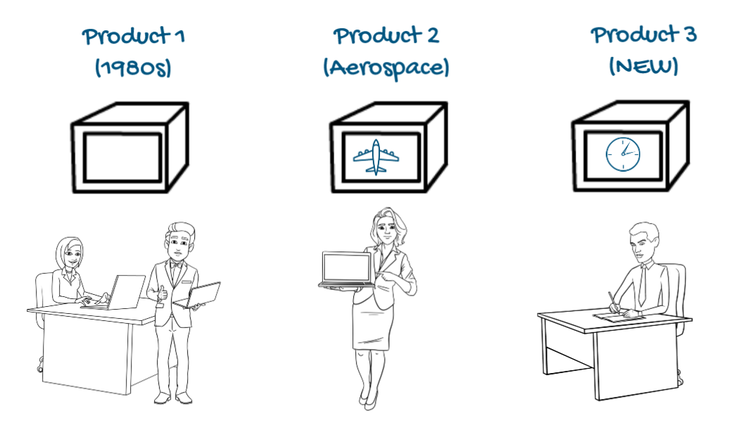
Product 1 team has been running since the 80’s and PTC Pro Engineer was the first tool to deliver parametric modelling. At the time, there was a lot of excitement and the group has kept the same tools over time.

Product 2 came along later, but was focused on Aerospace, somewhere where Catia was dominant. The Director made the decision to buy Catia.

When Product 3 was launched, it needed to be developed in a really short time. The director knew there could be cost savings in engineering talent who used Inventor. Thus to save resources, that group went with that tool.

Each of these product groups had their own different tools, which made them difficult to manage, to observe usage and forecast. Manufacturing only thought they needed 2D, so just had AutoCAD. The subcontractors were using Siemens NX.

At some point, a leader thought about this and considered the consequences. What is the best way to rationalize all of the engineering licenses?

Engineers would need training on the other CAD packages if they needed to move between departments. They wanted to consolidate standard parts across the products, but data was in different and incompatible CAD formats. Ultimately, having hundreds of different software vendor licenses meant they were being inefficient with user ratios – they had many licenses they were not using.

Another angle is how mergers and acquisitions impact companies. M&A can often bring together companies using different software vendors. While one of the benefits is the economies of scale, managers need to consider the best ways to use expensive resources. There is often an interest in consolidating all of the licenses to a single tool as soon as possible to allow engineers to work across projects and thus better manage talent as well.

Consider asking the following questions:

  • Which system will be used?
  • How many licenses are needed?
  • What are the costs?

Ask our team about how LAMUM could help you make better decisions about your engineering software road map and how to better centralize all of your engineering licenses.


Do You Have Licenses That Have Been Checked Out for Months?

Did you know that unused engineering licenses could be costing you thousands? Just think about all of the wasted money that your department may have invested in. This is especially crucial right now when smart decisions about these investments are even more important to consider.

Are your engineers hoarding engineering licenses?

It is important to look at the license checkout times. On average, engineers could be checking these for a couple of hours. When you see that engineers have had licenses checked out for months, this could be a red flag that the licenses may not be used fully to their capacity.

Would you like to see if multiple licenses are checked out? Or would you like to see inordinate long engineering software checkout times? Would you also be interested in having the ability to remove checked out licenses (with appropriate permissions)?

Would you also like to see who the user that is holding the engineering license is? LAMUM can help you have that visibility.

Make sure your management team is spending engineering funds wisely.

When you notice these small ways that the team could be using engineering software better, you can quickly notice how and where your team can save resources. Contact our team to schedule a demo or trial and we could show you where you can save.

Wondering how much you are wasting? We have tools that can help you. With LAMUM, your team will be able to see a wide variety of utilization and software asset tracking software.

Network Licenses & How They Work

Say we are looking at EDA applications (i.e. Mentor Graphics), they request a feature / license from centralized licenses server. Vendor daemon see if you are allowed to obtain one.

The idea is that these floating licenses can serve a greater number of staff. You may have purchased 100 licenses, but you have 150 staff (typically, we usually see that ratio – 2/3).

FlexLM / FlexNet is the most popular, but we also serve a great number of other licenses. We also support many other license types – you can view the full list here.

Corporate Evolution at the Division Level

Why do engineering teams use different engineering licenses?

There are any number of different ways teams and divisions are structured. But in this example, I will use R&D teams dedicated to product lines. Each Product division had the autonomy to make the decisions on which software they could purchase.

  • The Product 1 team has been running since the 80’s and PTC Pro Engineer was the first tool to deliver parametric modelling.
  • Product 2 came along later, but was for Aerospace, somewhere where Catia was dominant, so the Director made the decision to buy Catia.
  • When Product 3 was launched, it needed to be developed in a really short time, the director knew there was a lot of cheap Inventor engineers available on the resourcing market so went with Inventor.

Manufacturing only thought they needed 2D, so just had AutoCAD. The  Sub contractors were using Siemens NX.

At some point a leader thought about this and considered the consequences, Engineers would need training on the other CAD packages if they needed to move between departments.

They wanted to consolidate standard parts across the products, but data was in different and incompatible CAD formats. But ultimately, having 100’s of different software vendor licenses meant they were being inefficient with user ratios – they had many licenses they were not using.

This is where LAMUM comes in. We have helped many companies over the years centralize and bring more visibility and transparency to their engineering licenses.

Mergers & Acquisitions

M&A can often bring together companies using different software vendors. One of the benefits of M&A is the economies of scale, therefore the leadership will be keen to consolidate on a single tool as soon as possible. This will allow engineers to work across projects.

More licenses purchased as the Leadership panics on reports of license denials.

I once had the Chief Engineering bang on my desk and demand we buy more licenses as his team were getting license denials. I was able to show him the data, in that we only had 60% utilization during most of the days. But when he finished his Engineering review and demanded all the engineers get back to work, it blew the license ratio’s we worked to. He was able to stagger when engineers were needed on the system and all was good. Others are not so lucky.

Changing license models – Engineering

With each change, the cost of ownership increases. License models are designed to create confusion. Many companies have a mixture of perpetual, subscription and token based.

Change of Personnel or Outsourcing

I often see situations where a key admin has left the company and the managers have no idea about the license estate or how to monitor it.  Equally, management decide to outsource the IT Support function but didn’t consider the management of licenses to be a critical part of the contract.

How to Gain Control

  • Use the Software Asset Mantras.
  • Work to Right-size your license estate.
  • Increase or decrease to desired user ratios.
  • Have all the information for renewal negotiations.
  • Ensure licenses are compliant to vendor agreements.
  • Be prepared for a vendor audit.

Use LAMUM to discover a complete picture for license renewal negotiations:

  • Accurate license ratios
  • Zero Use licenses
  • Denial investigation and heatmaps
  • Reports by user or group
  • Average use

Use LAMUM to discover:

  • Know how many licenses you own
  • Know who uses the licenses
  • Know how often the licenses are used
  • Know where these licenses are being used
  • Know how much the licenses cost

Engineering Licenses Remix Time

Are you late to prepare for Vendor Renewals or License remix? Most vendors offer an opportunity to remix licenses every 3 or 6 months. How much do you know about your current engineering licenses? With many companies facing staffing changes, have your license needs for CAD, CAX, EDA, PLM, Simulation, Analysis and many others change?

How will you make educated decisions about how much you should be investing in these expensive engineering licenses? What are some questions you should ask? See our recommendation here.

Make sure to check out our Rightsizing Guide to learn more.

Ask us how our tool helps you make better decisions about the number of engineering licenses you need. Learn more.

In Startup Mode & Trying to Organize Your Engineering Team?

Was it just yesterday that your company was part of a small incubator trying to get initial funding and now you have a team of 25 or more engineers? Tomorrow, you might be facing a merger & acquisition, planning your exit strategy or planning to grow the business even further?

Do you know how many engineering licenses your team uses or truly needs on a daily basis? Sure, the process was easier when you just had a couple of people on your team and you could look across the room. Now that your business has matured –  management of CAD/CAE/EDA & PLM licenses will become more critical for maintaining productivity and controlling costs.

What if there was an easier way to see which engineering licenses are being used by the team? (Hint: there is – check out License Asset Manager with Usage Monitoring).

When funds are tight in the beginning stages, make sure you are making the most of your investment!

Even if your team still seems on the smaller side, imagine how far your organization will grow. The investment is relatively small, but the return on your investment will be fairly big – from saving time, resources and opportunities to spend your time more effectively.

Ask us how LAMUM can be essential tool for your engineering team!

Can Centralization Help You Manage Your Engineering Licenses?

The number of license managers / servers has increased and we often get asked which license managers we support (check out full list here).

In these changing times, managers often face the challenge of rearranging engineering license estates or managing different licenses at different times of the product lifecycle. Would not a centralized engineering license management system help?

How can you best manage, monitor and consolidate software license usage data? If you are looking to strictly manage the license side, check out our License Asset Manager or if you are looking more at usage, consider the Usage Monitoring side.

Would you like to have a centralized location or portal for administering and managing license files and license servers? If so, our experts can help.